Get Fabric or SQL Certified for Free.
Get certified for free when you join Fabric Data Days 2026 and dive into Fabric, Power BI, SQL, AI, and other essential data skills.
Join now- Power BI forums
- Get Help with Power BI
- Desktop
- Service
- Report Server
- Power Query
- Mobile Apps
- Developer
- DAX Commands and Tips
- Custom Visuals Development Discussion
- Health and Life Sciences
- Power BI Spanish forums
- Translated Spanish Desktop
- Training and Consulting
- Instructor Led Training
- Dashboard in a Day for Women, by Women
- Galleries
- Data Stories Gallery
- Themes Gallery
- Contests Gallery
- QuickViz Gallery
- Quick Measures Gallery
- Visual Calculations Gallery
- Fabric Apps Gallery
- Notebook Gallery
- Translytical Task Flow Gallery
- TMDL Gallery
- R Script Showcase
- Webinars and Video Gallery
- Ideas
- Custom Visuals Ideas (read-only)
- Issues
- Issues
- Events
- Upcoming Events
July 28 - August 9 | Final Round of the Power BI Dataviz World Championships. This is your chance. Learn more
- Power BI forums
- Forums
- Get Help with Power BI
- Desktop
- Power BI - How to use Python script to do a search...
- Subscribe to RSS Feed
- Mark Topic as New
- Mark Topic as Read
- Float this Topic for Current User
- Bookmark
- Subscribe
- Printer Friendly Page

- Mark as New
- Bookmark
- Subscribe
- Mute
- Subscribe to RSS Feed
- Permalink
- Report Inappropriate Content
Power BI - How to use Python script to do a search and replace
Hi,
I would like to use a Python script to do an automatic Search and Replace just like we can do with Excel.
In the following example, I would like to replace all the X by Y, I used the following script:
# 'dataset' holds the input data for this script
text1 = "X"
text1 = text1.replace('X', 'Y')
I do not get any error message but in the end, it's not working, X are still there.
Does anyone has any idea of what is wrong or is there another script that could do a Search and replace via Python in Power BI?
Thanks!
- Mark as New
- Bookmark
- Subscribe
- Mute
- Subscribe to RSS Feed
- Permalink
- Report Inappropriate Content
Hi there, im facing the same issue when i wanna make my automation data cleaning and after attempting so many code i think this one is gonna work on you too... here's the code
column_name = 'YourColumnName'
replacement_value = 'NewValue'
dataset[column_name].replace({'OldValue': replacement_value}, inplace=True)
- Mark as New
- Bookmark
- Subscribe
- Mute
- Subscribe to RSS Feed
- Permalink
- Report Inappropriate Content
Hi @Anonymous ,
Whether your problem has been resolved? If yes, could you please mark the helpful post as Answered? It will help the others in the community find the solution easily if they face the same problem with yours. Thank you.
Best Regards
- Mark as New
- Bookmark
- Subscribe
- Mute
- Subscribe to RSS Feed
- Permalink
- Report Inappropriate Content
Hi @Anonymous
I am still facing the issue but it looks like your script and mine are correct.
There is something wrong with Power BI but I am not able to figure it out.
Thanks
- Mark as New
- Bookmark
- Subscribe
- Mute
- Subscribe to RSS Feed
- Permalink
- Report Inappropriate Content
Hi @Anonymous ,
You can try to update the script as follow and check whether it works or not:
text1 = "X"
x = text1.replace("X", "Y")
print(x)
And it is easy to achieve it by using Table.ReplaceValue function in Power Query:
Replace multiple values in Power Query in one step

Best Regards
- Mark as New
- Bookmark
- Subscribe
- Mute
- Subscribe to RSS Feed
- Permalink
- Report Inappropriate Content
Hi @Anonymous and thank you for your reply!
I tried to use your script but unfortunately, it's not working for me. I have the same behavior as with the script I used previously.
And thanks for the Power Query process.
My goal with using python is to automate my data cleaning. This is for a report that I run every week and I am basically renaming a bunch of projects. I'd like to automate this part and just run a script to save some time.
- Mark as New
- Bookmark
- Subscribe
- Mute
- Subscribe to RSS Feed
- Permalink
- Report Inappropriate Content
Hi @Anonymous ,
Please update the script as below:
# 'dataset' holds the input data for this script
import pandas as pd
dataset['Text'] =pd.DataFrame(dataset['Text'].str.replace('X', 'Y', regex=False))
The original data in my table as shown in below screenshot:

After applied the above script can become the below result:
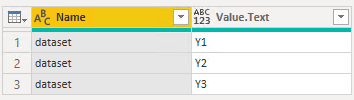
Best Regards
- Mark as New
- Bookmark
- Subscribe
- Mute
- Subscribe to RSS Feed
- Permalink
- Report Inappropriate Content
Why on Earth would you want to use Python to do something that's so easy to do in Power Query with the standard tools?
- Mark as New
- Bookmark
- Subscribe
- Mute
- Subscribe to RSS Feed
- Permalink
- Report Inappropriate Content
Hi @Anonymous
My goal with using python is to automate my data cleaning. This is for a report that I run every week and I am basically renaming a bunch of projects. I'd like to automate this part and just run a script to save some time.
Helpful resources

Fabric Community Sticker Challenge - Barcelona 2026
If you love stickers, then you will definitely want to check out our community sticker challenge, Barcelona edition!

Power BI Monthly Update - July 2026
Check out the July 2026 Power BI update to learn about new features.

Power BI DataViz World Championships - June 2026
A new Power BI DataViz World Championship is coming this June! Don't miss out on submitting your entry.

| User | Count |
|---|---|
| 29 | |
| 28 | |
| 20 | |
| 20 | |
| 19 |


| User | Count |
|---|---|
| 35 | |
| 28 | |
| 20 | |
| 18 | |
| 17 |


