Join the #PBI10 DataViz contest
Power BI is turning 10, and we’re marking the occasion with a special community challenge. Use your creativity to tell a story, uncover trends, or highlight something unexpected.
Get started- Power BI forums
- Get Help with Power BI
- Desktop
- Service
- Report Server
- Power Query
- Mobile Apps
- Developer
- DAX Commands and Tips
- Custom Visuals Development Discussion
- Health and Life Sciences
- Power BI Spanish forums
- Translated Spanish Desktop
- Training and Consulting
- Instructor Led Training
- Dashboard in a Day for Women, by Women
- Galleries
- Webinars and Video Gallery
- Data Stories Gallery
- Themes Gallery
- Contests Gallery
- Quick Measures Gallery
- Notebook Gallery
- Translytical Task Flow Gallery
- R Script Showcase
- Ideas
- Custom Visuals Ideas (read-only)
- Issues
- Issues
- Events
- Upcoming Events
Join us for an expert-led overview of the tools and concepts you'll need to become a Certified Power BI Data Analyst and pass exam PL-300. Register now.
- Power BI forums
- Forums
- Get Help with Power BI
- Desktop
- Power BI Desktop keeps asking to sign in
- Subscribe to RSS Feed
- Mark Topic as New
- Mark Topic as Read
- Float this Topic for Current User
- Bookmark
- Subscribe
- Printer Friendly Page


- Mark as New
- Bookmark
- Subscribe
- Mute
- Subscribe to RSS Feed
- Permalink
- Report Inappropriate Content
Power BI Desktop keeps asking to sign in
Every time I open Power BI Desktop (regardless of whether I'm opening an existing file) it keeps asking me to sign in. We use MFA so this is highly annoying. I've Google'd and found similar threads but from the way-back. I'm running the latest version (2.118.828.0 64-bit (June 2023)).
We've tried a repair on the install but no luck. Any advice?
Solved! Go to Solution.


- Mark as New
- Bookmark
- Subscribe
- Mute
- Subscribe to RSS Feed
- Permalink
- Report Inappropriate Content
Turn off the option>preview feature that saves to one drive and sharepoint


- Mark as New
- Bookmark
- Subscribe
- Mute
- Subscribe to RSS Feed
- Permalink
- Report Inappropriate Content
Almost 2 years on and five pages of confirmation but this is still an issue. Driving me nuts RN as I am doing a lot of work for one client where none of the workarounds above are effective.
My one mitigation tactic is that is seems to be "per windows session", as long as you keep a Power BI window open. So my daily workflow is:
1. start Power BI and sign in twice. Leave it open with an Untitled (empty) file, until I shut down
2. open actual PBIX files and do work. These extra "sessions" don't seem to trigger this bug.
I've started a support case to try to draw attention to this issue: 2506020030000227 if anyone from Microsoft is listening ...

- Mark as New
- Bookmark
- Subscribe
- Mute
- Subscribe to RSS Feed
- Permalink
- Report Inappropriate Content
turning off
File>options and settings>options>Preview features
Save to one drive.
did not work for me.
this prompt for login started recently, seems very persistent after a reboot.
- Mark as New
- Bookmark
- Subscribe
- Mute
- Subscribe to RSS Feed
- Permalink
- Report Inappropriate Content
In my case, the solution was make the new instalation, the new version of PBI.

- Mark as New
- Bookmark
- Subscribe
- Mute
- Subscribe to RSS Feed
- Permalink
- Report Inappropriate Content
I reinstalled Power BI today (2024-11-12) and the sign-in problem disappeared. I checked the Preview feature "Save to OneDrive and SharePoint," and the option is turned off, as suggested by Community Administrator. A year ago, it did not work. Finally, it works; my last version of Power BI was 2023-11 (I was forced to downgrade in 2024) and upgraded today.

- Mark as New
- Bookmark
- Subscribe
- Mute
- Subscribe to RSS Feed
- Permalink
- Report Inappropriate Content
Still having this issue in June 2024.
Version 2.129.1229.0
None of the workarounds mentioned here worked.


- Mark as New
- Bookmark
- Subscribe
- Mute
- Subscribe to RSS Feed
- Permalink
- Report Inappropriate Content
Any luck. suddenly I also started facing the same issue since last week. I unchecked the preview options as suggested in this thread.
Please suggest if you were able to fix it.
- Mark as New
- Bookmark
- Subscribe
- Mute
- Subscribe to RSS Feed
- Permalink
- Report Inappropriate Content
Still asks to sigh in. Power BI version 2024-03-04. Any ideas?
- Mark as New
- Bookmark
- Subscribe
- Mute
- Subscribe to RSS Feed
- Permalink
- Report Inappropriate Content
Same here. Latest version and none of the workarounds worked.

- Mark as New
- Bookmark
- Subscribe
- Mute
- Subscribe to RSS Feed
- Permalink
- Report Inappropriate Content
Yet another person having issues with this here! talking to you from 2024 March 1st!
One would guess that this should have been fixed already but here we are.
Except, I did find a solution, and it's not Idris' one up there.
I went back on my steps, and I do remember messing with the windows Hello configuration for my laptop, just setting up the fingerprint for easy access and whatnot. I do remember checking something like use windows hello for authentication or something (seemed legit at the moment)
Around that time, there was also a small PBI outage, so I didn't think much when the PBI desktop started asking me for the password, and it also requested one of my coworkers to do it, so I htought that was it.
Fast forward 2 weeks and every single time that I open PBI I have 2 sign in twice, and we use MFA which means notifications, codes, everything... twice. Darn!
SO I found this thread, did everything to no avail.
Until (solution is here )
I remembered the windows hello thingy, started searching in my browsers for related stuff, found nothing, Brave (default), Chrome, Edge... Then I remembered that there was this thing called "Internet properties" in which MS stores some global protection things for Edge and other browsers, went there and found:
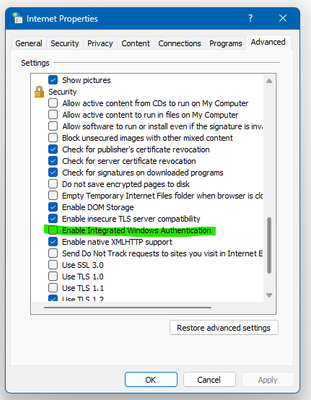
The option "Enable Integrated Windows Authentication" was checked for me. (as much as I looked for the option in the control panel and windows hello configuration I could not find were to disable the thing I had checked before, but it seems like I was on the right path)
So after unchecking the green option, and applying. I reopened PBI, logged in for the last time, closed it, crossed my fingers and I was logged in.... god, the relief!
ok, cheers, have a good one kind strangers!
- Mark as New
- Bookmark
- Subscribe
- Mute
- Subscribe to RSS Feed
- Permalink
- Report Inappropriate Content
Thanks, it helped me fix the issue.

- Mark as New
- Bookmark
- Subscribe
- Mute
- Subscribe to RSS Feed
- Permalink
- Report Inappropriate Content
Thanks so much, this one has been frustrating for a while
- Mark as New
- Bookmark
- Subscribe
- Mute
- Subscribe to RSS Feed
- Permalink
- Report Inappropriate Content
Thanks dude, you're a lifesaver

- Mark as New
- Bookmark
- Subscribe
- Mute
- Subscribe to RSS Feed
- Permalink
- Report Inappropriate Content
It worked for me. Thanks
how can I mark it as solved?
- Mark as New
- Bookmark
- Subscribe
- Mute
- Subscribe to RSS Feed
- Permalink
- Report Inappropriate Content
Turn off the option>preview feature that saves to one drive and sharepoint
- Mark as New
- Bookmark
- Subscribe
- Mute
- Subscribe to RSS Feed
- Permalink
- Report Inappropriate Content
Done that also.. but no luck

- Mark as New
- Bookmark
- Subscribe
- Mute
- Subscribe to RSS Feed
- Permalink
- Report Inappropriate Content
I had already reinstalled the app twice and was at one step of formatting my machine to try fixing this bug. Problem solved! Thank you! 😁😁
- Mark as New
- Bookmark
- Subscribe
- Mute
- Subscribe to RSS Feed
- Permalink
- Report Inappropriate Content
I did have both options checked and when unchecked the multiple logins stopped. I ❤️ U @MrSyte

- Mark as New
- Bookmark
- Subscribe
- Mute
- Subscribe to RSS Feed
- Permalink
- Report Inappropriate Content

- Mark as New
- Bookmark
- Subscribe
- Mute
- Subscribe to RSS Feed
- Permalink
- Report Inappropriate Content
Didn't work for me 😞 I had this feature already turned off.


- Mark as New
- Bookmark
- Subscribe
- Mute
- Subscribe to RSS Feed
- Permalink
- Report Inappropriate Content
Thanks for the suggestion @MrSyte.
Early testing, 2 minutes in, would suggest this works.
How did you come across this issue/fix?
| Have I solved your problem? Please click Accept as Solution so I don't keep coming back to this post, oh yeah, others may find it useful also ;). |
| If you found this post helpful, please give Kudos. It gives me a sense of instant gratification and, if you give me Kudos enough times, magical unicorns will appear on your screen. If you find my signature vaguely amusing, please give Kudos. | Proud to be a Super User! |

Helpful resources

Join our Fabric User Panel
This is your chance to engage directly with the engineering team behind Fabric and Power BI. Share your experiences and shape the future.

Power BI Monthly Update - June 2025
Check out the June 2025 Power BI update to learn about new features.

Fabric Community Update - June 2025
Find out what's new and trending in the Fabric community.

| User | Count |
|---|---|
| 80 | |
| 76 | |
| 60 | |
| 36 | |
| 33 |


| User | Count |
|---|---|
| 91 | |
| 60 | |
| 59 | |
| 49 | |
| 45 |


