- Power BI forums
- Updates
- News & Announcements
- Get Help with Power BI
- Desktop
- Service
- Report Server
- Power Query
- Mobile Apps
- Developer
- DAX Commands and Tips
- Custom Visuals Development Discussion
- Health and Life Sciences
- Power BI Spanish forums
- Translated Spanish Desktop
- Power Platform Integration - Better Together!
- Power Platform Integrations (Read-only)
- Power Platform and Dynamics 365 Integrations (Read-only)
- Training and Consulting
- Instructor Led Training
- Dashboard in a Day for Women, by Women
- Galleries
- Community Connections & How-To Videos
- COVID-19 Data Stories Gallery
- Themes Gallery
- Data Stories Gallery
- R Script Showcase
- Webinars and Video Gallery
- Quick Measures Gallery
- 2021 MSBizAppsSummit Gallery
- 2020 MSBizAppsSummit Gallery
- 2019 MSBizAppsSummit Gallery
- Events
- Ideas
- Custom Visuals Ideas
- Issues
- Issues
- Events
- Upcoming Events
- Community Blog
- Power BI Community Blog
- Custom Visuals Community Blog
- Community Support
- Community Accounts & Registration
- Using the Community
- Community Feedback
Earn a 50% discount on the DP-600 certification exam by completing the Fabric 30 Days to Learn It challenge.
- Power BI forums
- Forums
- Get Help with Power BI
- Desktop
- Re: Power BI Desktop keeps asking to sign in
- Subscribe to RSS Feed
- Mark Topic as New
- Mark Topic as Read
- Float this Topic for Current User
- Bookmark
- Subscribe
- Printer Friendly Page


- Mark as New
- Bookmark
- Subscribe
- Mute
- Subscribe to RSS Feed
- Permalink
- Report Inappropriate Content
Power BI Desktop keeps asking to sign in
Every time I open Power BI Desktop (regardless of whether I'm opening an existing file) it keeps asking me to sign in. We use MFA so this is highly annoying. I've Google'd and found similar threads but from the way-back. I'm running the latest version (2.118.828.0 64-bit (June 2023)).
We've tried a repair on the install but no luck. Any advice?

- Mark as New
- Bookmark
- Subscribe
- Mute
- Subscribe to RSS Feed
- Permalink
- Report Inappropriate Content
Still asks to sigh in. Power BI version 2024-03-04. Any ideas?

- Mark as New
- Bookmark
- Subscribe
- Mute
- Subscribe to RSS Feed
- Permalink
- Report Inappropriate Content
Yet another person having issues with this here! talking to you from 2024 March 1st!
One would guess that this should have been fixed already but here we are.
Except, I did find a solution, and it's not Idris' one up there.
I went back on my steps, and I do remember messing with the windows Hello configuration for my laptop, just setting up the fingerprint for easy access and whatnot. I do remember checking something like use windows hello for authentication or something (seemed legit at the moment)
Around that time, there was also a small PBI outage, so I didn't think much when the PBI desktop started asking me for the password, and it also requested one of my coworkers to do it, so I htought that was it.
Fast forward 2 weeks and every single time that I open PBI I have 2 sign in twice, and we use MFA which means notifications, codes, everything... twice. Darn!
SO I found this thread, did everything to no avail.
Until (solution is here )
I remembered the windows hello thingy, started searching in my browsers for related stuff, found nothing, Brave (default), Chrome, Edge... Then I remembered that there was this thing called "Internet properties" in which MS stores some global protection things for Edge and other browsers, went there and found:
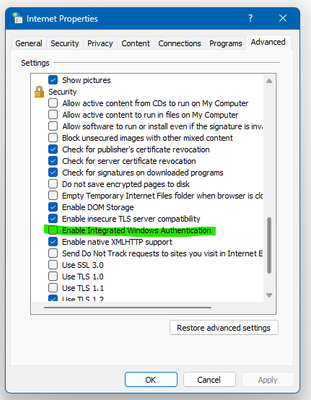
The option "Enable Integrated Windows Authentication" was checked for me. (as much as I looked for the option in the control panel and windows hello configuration I could not find were to disable the thing I had checked before, but it seems like I was on the right path)
So after unchecking the green option, and applying. I reopened PBI, logged in for the last time, closed it, crossed my fingers and I was logged in.... god, the relief!
ok, cheers, have a good one kind strangers!

- Mark as New
- Bookmark
- Subscribe
- Mute
- Subscribe to RSS Feed
- Permalink
- Report Inappropriate Content
Thanks dude, you're a lifesaver

- Mark as New
- Bookmark
- Subscribe
- Mute
- Subscribe to RSS Feed
- Permalink
- Report Inappropriate Content
It worked for me. Thanks
how can I mark it as solved?

- Mark as New
- Bookmark
- Subscribe
- Mute
- Subscribe to RSS Feed
- Permalink
- Report Inappropriate Content
Turn off the option>preview feature that saves to one drive and sharepoint

- Mark as New
- Bookmark
- Subscribe
- Mute
- Subscribe to RSS Feed
- Permalink
- Report Inappropriate Content
I had already reinstalled the app twice and was at one step of formatting my machine to try fixing this bug. Problem solved! Thank you! 😁😁
- Mark as New
- Bookmark
- Subscribe
- Mute
- Subscribe to RSS Feed
- Permalink
- Report Inappropriate Content
I did have both options checked and when unchecked the multiple logins stopped. I ❤️ U @MrSyte

- Mark as New
- Bookmark
- Subscribe
- Mute
- Subscribe to RSS Feed
- Permalink
- Report Inappropriate Content

- Mark as New
- Bookmark
- Subscribe
- Mute
- Subscribe to RSS Feed
- Permalink
- Report Inappropriate Content
Didn't work for me 😞 I had this feature already turned off.


- Mark as New
- Bookmark
- Subscribe
- Mute
- Subscribe to RSS Feed
- Permalink
- Report Inappropriate Content
Thanks for the suggestion @MrSyte.
Early testing, 2 minutes in, would suggest this works.
How did you come across this issue/fix?
| Have I solved your problem? Please click Accept as Solution so I don't keep coming back to this post, oh yeah, others may find it useful also ;). |
| If you found this post helpful, please give Kudos. It gives me a sense of instant gratification and, if you give me Kudos enough times, magical unicorns will appear on your screen. If you find my signature vaguely amusing, please give Kudos. | Proud to be a Super User! |
- Mark as New
- Bookmark
- Subscribe
- Mute
- Subscribe to RSS Feed
- Permalink
- Report Inappropriate Content
A wise coworker that asked "What the heck did you do now????" LOL 😎
- Mark as New
- Bookmark
- Subscribe
- Mute
- Subscribe to RSS Feed
- Permalink
- Report Inappropriate Content
Honestly I turned on the feature when going to turn on the copilot suggestion that is also in preview.

- Mark as New
- Bookmark
- Subscribe
- Mute
- Subscribe to RSS Feed
- Permalink
- Report Inappropriate Content
I've just started getting this in the last week or so and it's really annoying. I can see I'm already logged in but this window keeps popping up several times and getting in the way. Seems to make no difference whether I select my work account or just click on the x to close. We're running the September release 2.121.903.0
- Mark as New
- Bookmark
- Subscribe
- Mute
- Subscribe to RSS Feed
- Permalink
- Report Inappropriate Content
Turn off the option>preview feature that saves to one drive and sharepoint
- Mark as New
- Bookmark
- Subscribe
- Mute
- Subscribe to RSS Feed
- Permalink
- Report Inappropriate Content
I uncheck everyting in Options->Preview.
Restarted BI Desktop
Start BI Desktop
Login is still being asked, over and over again
- Mark as New
- Bookmark
- Subscribe
- Mute
- Subscribe to RSS Feed
- Permalink
- Report Inappropriate Content
it's maddening. I've given up using the desktop version. All the comments in here don't work - I suspect there is something else going on and it's just not understood by the people responding.
To make matters worse - this started happening with Teams about a week ago - but thankfully - at least - in the case with Teams it goes away eventually.
I said this to my internal IT staff - I don't think this is a PowerBI issue - I think its an ActiveDirectory / Windows user profile type of issue.
- Mark as New
- Bookmark
- Subscribe
- Mute
- Subscribe to RSS Feed
- Permalink
- Report Inappropriate Content
Hi @CathyPalmer,
Microsoft have confirmed they're aware of it and it should be fixed in the next release.
If it's a really big issue for you, you could try to go back to the July release.
If you scroll to the bottom of the July notes, there are download links.
And, if you use the Store version of Power BI Desktop, you don't have to uninstall it, you can run the store version and the web version on your machine separately. I usually run the previous month's version of the web version to deal with things like this.
| Have I solved your problem? Please click Accept as Solution so I don't keep coming back to this post, oh yeah, others may find it useful also ;). |
| If you found this post helpful, please give Kudos. It gives me a sense of instant gratification and, if you give me Kudos enough times, magical unicorns will appear on your screen. If you find my signature vaguely amusing, please give Kudos. | Proud to be a Super User! |

- Mark as New
- Bookmark
- Subscribe
- Mute
- Subscribe to RSS Feed
- Permalink
- Report Inappropriate Content
Hello @CathyPalmer ,
Did you check the steps in this thread Sign-in Bug Fixed !!
If I answered your question, please mark my post as solution, Appreciate your Kudos 👍
Follow me on Linkedin
Vote for my Community Mobile App Idea 💡
Proud to be a Super User! |  |
- Mark as New
- Bookmark
- Subscribe
- Mute
- Subscribe to RSS Feed
- Permalink
- Report Inappropriate Content
Steps in that link worked perfectly thanks
- Mark as New
- Bookmark
- Subscribe
- Mute
- Subscribe to RSS Feed
- Permalink
- Report Inappropriate Content
He's on a later version than you said to update to and he's having the issue. I am likewise on the August version and it's broken - I even had Microsoft on a screenshare where they collected logs and data and it was still busted. Please stop referring to your post which doesn't fix the issue.

Helpful resources


Power BI Monthly Update - April 2024
Check out the April 2024 Power BI update to learn about new features.

Fabric Community Update - April 2024
Find out what's new and trending in the Fabric Community.

| User | Count |
|---|---|
| 93 | |
| 85 | |
| 78 | |
| 68 | |
| 62 |


| User | Count |
|---|---|
| 113 | |
| 99 | |
| 96 | |
| 64 | |
| 58 |


