Get certified for free when you join Fabric Data Days 2026 and dive into Fabric, Power BI, SQL, AI, and other essential data skills.
Join nowJuly 7 - July 17 | Round 2 of the Power BI Dataviz World Championships. Don't miss your chance! Learn more
Hi! I've added a reference layer to my Azure map in PowerBI but it is not visible on the map. At first I was getting an error that the file could not be parsed, but I'm no longer getting that message. Here is what's in my geojson file:
{
"type": "Feature",
"geometry": {
"type":"Polygon",
"coordinates":[
[ 57.0, -162.0 ],
[ 56.0, -162.0 ],
[ 56.0, -164.0 ],
[ 57.0, -164.0 ],
[ 57.0, -162.0 ]
]
},
"properties": {
"fillColor":"#FF8A8A"
}
}
Solved! Go to Solution.
Hi allison_t,
If you want to add a polygon to your Azure Maps visual as a reference layer you have to format your .json or .geojson slighly differently than a point feature. Here is a link to give you an idea: GeoJSON - Wikipedia.
But for your example, try changing it to the below code snippet. I noticed that in your example the polygon lands to the east of Madagascar.
That should get you going, if you are looking for a solution that will help you build complex polygons, bring them into Power BI, and link those polygons to your dataset, check out the EasyTerritory Power BI visual Territory Visual by EasyTerritory
{"type":"FeatureCollection","features":[{"type":"Feature","geometry":{"type":"MultiPolygon","coordinates":[[[[57.0,-162.0],[56.0,-162.0],[56.0,-164.0],[57.0,-164.0],[57.0,-162.0]]]]},"properties":{"fillColor":"#FF8A8A"}}]}
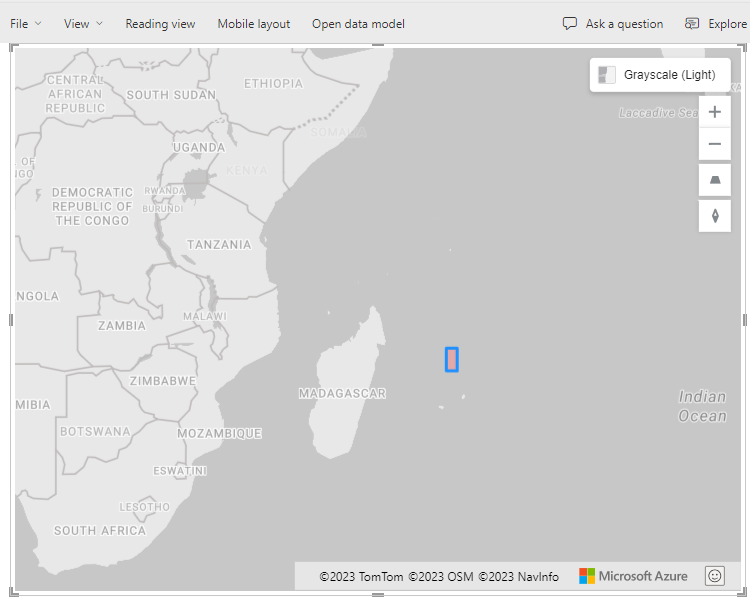
Take care,
Matt
Hi allison_t,
If you want to add a polygon to your Azure Maps visual as a reference layer you have to format your .json or .geojson slighly differently than a point feature. Here is a link to give you an idea: GeoJSON - Wikipedia.
But for your example, try changing it to the below code snippet. I noticed that in your example the polygon lands to the east of Madagascar.
That should get you going, if you are looking for a solution that will help you build complex polygons, bring them into Power BI, and link those polygons to your dataset, check out the EasyTerritory Power BI visual Territory Visual by EasyTerritory
{"type":"FeatureCollection","features":[{"type":"Feature","geometry":{"type":"MultiPolygon","coordinates":[[[[57.0,-162.0],[56.0,-162.0],[56.0,-164.0],[57.0,-164.0],[57.0,-162.0]]]]},"properties":{"fillColor":"#FF8A8A"}}]}
Take care,
Matt
@mroot Thank you!! I couldn't find examples of a polygon and had started with a point feature example that I found, that would explain where I missed a few steps. Appreciate your help!
Join us in Barcelona for FabCon and SQLCon, the Fabric, Power BI, SQL, and AI community event. Save €200 with code FABCMTY200.
Join Fabric Data Days 2026: 60 days of free live/on-demand sessions, challenges, study groups, and certification opportunities.
| User | Count |
|---|---|
| 23 | |
| 19 | |
| 18 | |
| 17 | |
| 13 |
| User | Count |
|---|---|
| 60 | |
| 52 | |
| 47 | |
| 40 | |
| 38 |