This time we’re going bigger than ever. Fabric, Power BI, SQL, AI and more. We're covering it all. You won't want to miss it.
Learn moreLevel up your Power BI skills this month - build one visual each week and tell better stories with data! Get started
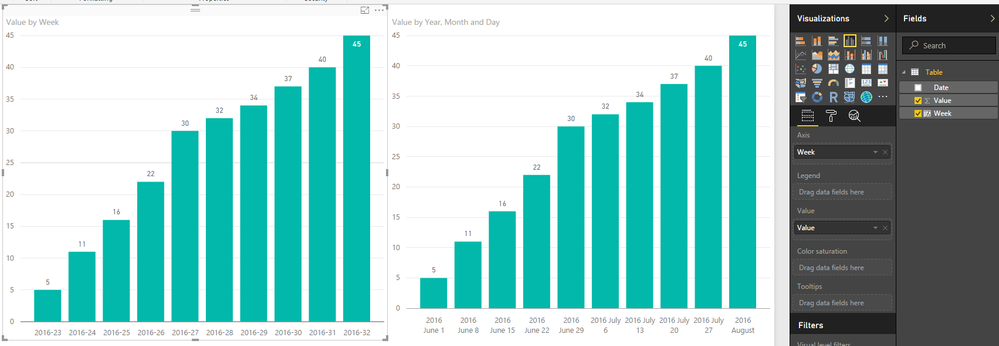
I have this data below which is collected once a week. I've tried a few differnt ways of plotting this and Power BI doesn't seem to like it. What am I missing and how can I work with this data?
| 1-Jun | 5 |
| 8-Jun | 11 |
| 15-Jun | 16 |
| 22-Jun | 22 |
| 29-Jun | 30 |
| 6-Jul | 32 |
| 13-Jul | 34 |
| 20-Jul | 37 |
| 27-Jul | 40 |
| 3-Aug | 45 |
Solved! Go to Solution.
Week = YEAR(Table[Date])&"-"&WEEKNUM(Table[Date])
That is a lot more elegant than the solution I was attempting to work towards. Thanks!
what exactly doesn't PBI like?
I am new to Power BI and have tried to plot similar weekly data. I tried using the formula given in the post but I couldn't get it to work. Please could somebody show me how to do this so that I can show data collected on a weekly basis on a graph, and show the date rather than week number on the axis (just as in the example above)
Week = YEAR(Table[Date])&"-"&WEEKNUM(Table[Date])
@travbum Well since you said "elegant" now I feel compelled to give you the solution that will sort weeks 1 thru 9 properly
Year-Week =
YEAR ( 'Calendar'[Date] ) & "-"
& CONCATENATE (
IF ( WEEKNUM ( 'Calendar'[Date] ) < 10, "0", "" ),
WEEKNUM ( 'Calendar'[Date] )
)
Check out the April 2026 Power BI update to learn about new features.
Sign up to receive a private message when registration opens and key events begin.
If you have recently started exploring Fabric, we'd love to hear how it's going. Your feedback can help with product improvements.
| User | Count |
|---|---|
| 36 | |
| 29 | |
| 29 | |
| 21 | |
| 18 |
| User | Count |
|---|---|
| 71 | |
| 43 | |
| 33 | |
| 24 | |
| 23 |