Don't miss your chance to take the Fabric Data Engineer (DP-600) exam for FREE! Find out how by watching the DP-600 session on-demand now through April 28th.
Learn moreJoin the FabCon + SQLCon recap series. Up next: Power BI, Real-Time Intelligence, IQ and AI, and Data Factory take center stage. All sessions are available on-demand after the live show. Register now
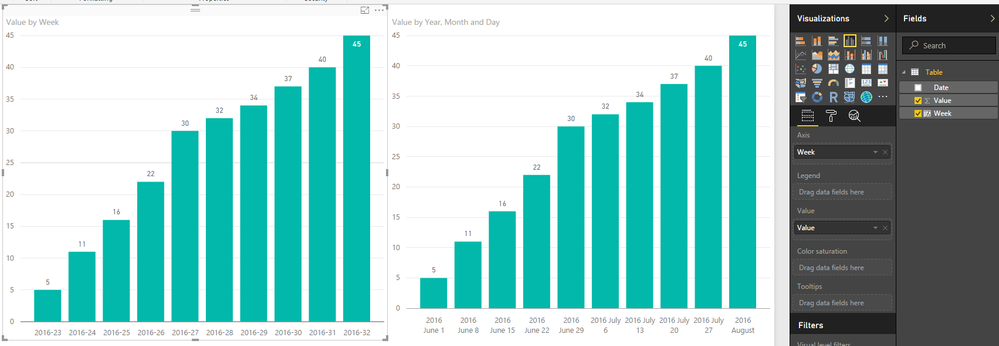
I have this data below which is collected once a week. I've tried a few differnt ways of plotting this and Power BI doesn't seem to like it. What am I missing and how can I work with this data?
| 1-Jun | 5 |
| 8-Jun | 11 |
| 15-Jun | 16 |
| 22-Jun | 22 |
| 29-Jun | 30 |
| 6-Jul | 32 |
| 13-Jul | 34 |
| 20-Jul | 37 |
| 27-Jul | 40 |
| 3-Aug | 45 |
Solved! Go to Solution.
Week = YEAR(Table[Date])&"-"&WEEKNUM(Table[Date])
That is a lot more elegant than the solution I was attempting to work towards. Thanks!
what exactly doesn't PBI like?
I am new to Power BI and have tried to plot similar weekly data. I tried using the formula given in the post but I couldn't get it to work. Please could somebody show me how to do this so that I can show data collected on a weekly basis on a graph, and show the date rather than week number on the axis (just as in the example above)
Week = YEAR(Table[Date])&"-"&WEEKNUM(Table[Date])
@travbum Well since you said "elegant" now I feel compelled to give you the solution that will sort weeks 1 thru 9 properly
Year-Week =
YEAR ( 'Calendar'[Date] ) & "-"
& CONCATENATE (
IF ( WEEKNUM ( 'Calendar'[Date] ) < 10, "0", "" ),
WEEKNUM ( 'Calendar'[Date] )
)
Check out the April 2026 Power BI update to learn about new features.
If you have recently started exploring Fabric, we'd love to hear how it's going. Your feedback can help with product improvements.
A new Power BI DataViz World Championship is coming this June! Don't miss out on submitting your entry.
| User | Count |
|---|---|
| 48 | |
| 40 | |
| 38 | |
| 20 | |
| 17 |
| User | Count |
|---|---|
| 68 | |
| 65 | |
| 30 | |
| 26 | |
| 25 |