Join us at FabCon Atlanta from March 16 - 20, 2026, for the ultimate Fabric, Power BI, AI and SQL community-led event. Save $200 with code FABCOMM.
Register now!The Power BI Data Visualization World Championships is back! Get ahead of the game and start preparing now! Learn more
I want to be able to pivot how data looks in a matrix. I have the following table currently existing:
| Item | A | B | A | B |
| Hour | 9 | 9 | 10 | 10 |
| Day | ||||
| Mon | xyz | xyz | xyz | xyz |
| Tue | xyz | xyz | xyz | xyz |
| Wed | xyz | xyz | xyz | xyz |
I want to be able to pivot the table so that my values are showing as following:
| Hour | 9 | 10 | 11 | 12 |
| Mon A | ||||
| Mon B | ||||
| Tue A | ||||
Tue B |
Essentially the table will show the day of the week twice so that I can easily compare.
The values/fields I have are:
1. Day of the Week
2. Hour
3. Value A
4. Value B
Solved! Go to Solution.
Hi @andrewb95 ,
I created some data:
Here are the steps you can follow:
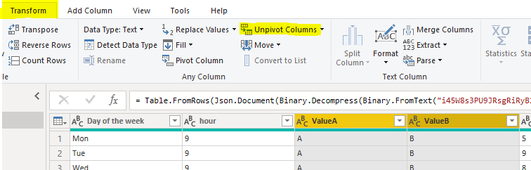
1. Enter the power query, select ValueA and ValueB two columns, click Transform-Unpivot Columns
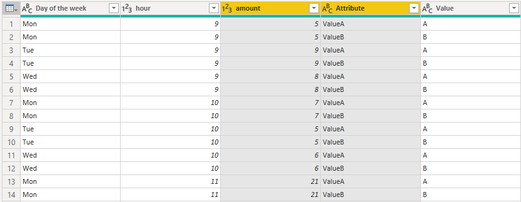
Result:
2. Create calculated column.
Day_of_the_week = 'Table'[Day of the week] &""& 'Table'[Value]
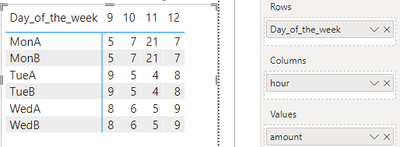
3. Result:
Best Regards,
Liu Yang
If this post helps, then please consider Accept it as the solution to help the other members find it more quickly
Hi @andrewb95 ,
I created some data:
Here are the steps you can follow:
1. Enter the power query, select ValueA and ValueB two columns, click Transform-Unpivot Columns
Result:
2. Create calculated column.
Day_of_the_week = 'Table'[Day of the week] &""& 'Table'[Value]
3. Result:
Best Regards,
Liu Yang
If this post helps, then please consider Accept it as the solution to help the other members find it more quickly
Not sure if it 100% meets you requirement but in the Values section of the matrix Format pane there is a setting called "Show On Rows". Try enabling it.
The Power BI Data Visualization World Championships is back! Get ahead of the game and start preparing now!
| User | Count |
|---|---|
| 39 | |
| 37 | |
| 33 | |
| 32 | |
| 29 |
| User | Count |
|---|---|
| 132 | |
| 88 | |
| 82 | |
| 68 | |
| 64 |