cancel
Showing results for 
Search instead for 
Did you mean: 

The Power BI Data Visualization World Championships is back! Get ahead of the game and start preparing now! Learn more

Reply
Anonymous
Not applicable

Create Revenue vs Target

Hi Team, i have revenue and target are two different fields based on that i want to create below dax functions, can you please help me to create below dax and both tables dont have relationship.


Revenue VS Target = Revenue / Target (in percentage)

Simulation Formula:

Unit Price Scenario = is a number from -1 to 1, increased by 0.5 use generate series function to create this using parameter in the modeling tab. This will be used in a filter to select price as below:

Revenue Scenario = Quantity of Items * (1 + Unit Price Scenario Value) * Unit Price

Revenue Scenario VS Target = Revenue Scenario / Target

1 ACCEPTED SOLUTION
Anonymous
Not applicable

Hi @Anonymous 

According to your statement, I think "Unit Price Scenario" is created by What if parameter option. Here I create a sample to have a test.

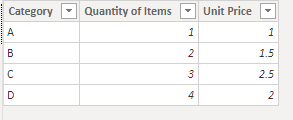
Revenue:

1.png

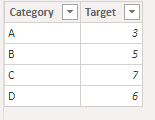
Target:

2.png

There is no relationship between two tables.

Measure:

Revenue Scenario VS Target = 
VAR _Unit_Price_Scenario_Value =
    SELECTEDVALUE ( 'Unit Price Scenario'[Unit Price Scenario] )
VAR _Revenue_Scenario =
    SUM ( Revenue[Quantity of Items] ) * ( 1 + _Unit_Price_Scenario_Value )
        * SUM ( Revenue[Unit Price] )
VAR _Target =
    CALCULATE (
        SUM ( Target[Target] ),
        FILTER ( ALL ( Target ), Target[Category] = MAX ( Revenue[Category] ) )
    )
RETURN
    DIVIDE ( _Revenue_Scenario, _Target )

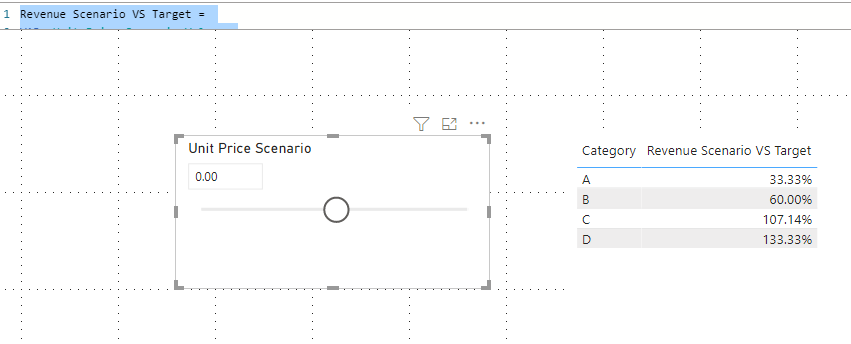
Result is as below.

2.png

Best Regards,
Rico Zhou


If this post helps, then please consider Accept it as the solution to help the other members find it more quickly.


View solution in original post

2 REPLIES 2
Anonymous
Not applicable

Hi @Anonymous 

According to your statement, I think "Unit Price Scenario" is created by What if parameter option. Here I create a sample to have a test.

Revenue:

1.png

Target:

2.png

There is no relationship between two tables.

Measure:

Revenue Scenario VS Target = 
VAR _Unit_Price_Scenario_Value =
    SELECTEDVALUE ( 'Unit Price Scenario'[Unit Price Scenario] )
VAR _Revenue_Scenario =
    SUM ( Revenue[Quantity of Items] ) * ( 1 + _Unit_Price_Scenario_Value )
        * SUM ( Revenue[Unit Price] )
VAR _Target =
    CALCULATE (
        SUM ( Target[Target] ),
        FILTER ( ALL ( Target ), Target[Category] = MAX ( Revenue[Category] ) )
    )
RETURN
    DIVIDE ( _Revenue_Scenario, _Target )

Result is as below.

2.png

Best Regards,
Rico Zhou


If this post helps, then please consider Accept it as the solution to help the other members find it more quickly.


amitchandak
Super User
Super User

@Anonymous , Not very clear. You need what if for Unit Price Scenario, what is issues all measures some wring values ?


The information you have provided is not making the problem clear to me. Can you please explain with an example.

Appreciate your Kudos.

Share with Power BI Enthusiasts: Full Power BI Video (20 Hours) YouTube
Microsoft Fabric Series 60+ Videos YouTube
Microsoft Fabric Hindi End to End YouTube

Helpful resources

Announcements
Power BI DataViz World Championships

Power BI Dataviz World Championships

The Power BI Data Visualization World Championships is back! Get ahead of the game and start preparing now!

December 2025 Power BI Update Carousel

Power BI Monthly Update - December 2025

Check out the December 2025 Power BI Holiday Recap!

FabCon Atlanta 2026 carousel

FabCon Atlanta 2026

Join us at FabCon Atlanta, March 16-20, for the ultimate Fabric, Power BI, AI and SQL community-led event. Save $200 with code FABCOMM.