Join us at FabCon Atlanta from March 16 - 20, 2026, for the ultimate Fabric, Power BI, AI and SQL community-led event. Save $200 with code FABCOMM.
Register now!The Power BI Data Visualization World Championships is back! It's time to submit your entry. Live now!
Hi Team, i have revenue and target are two different fields based on that i want to create below dax functions, can you please help me to create below dax and both tables dont have relationship.
Revenue VS Target = Revenue / Target (in percentage)
Simulation Formula:
Unit Price Scenario = is a number from -1 to 1, increased by 0.5 use generate series function to create this using parameter in the modeling tab. This will be used in a filter to select price as below:
Revenue Scenario = Quantity of Items * (1 + Unit Price Scenario Value) * Unit Price
Revenue Scenario VS Target = Revenue Scenario / Target
Solved! Go to Solution.
Hi @Anonymous
According to your statement, I think "Unit Price Scenario" is created by What if parameter option. Here I create a sample to have a test.
Revenue:
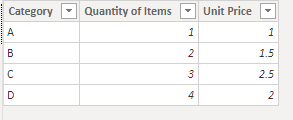
Target:
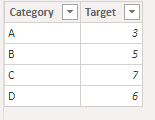
There is no relationship between two tables.
Measure:
Revenue Scenario VS Target =
VAR _Unit_Price_Scenario_Value =
SELECTEDVALUE ( 'Unit Price Scenario'[Unit Price Scenario] )
VAR _Revenue_Scenario =
SUM ( Revenue[Quantity of Items] ) * ( 1 + _Unit_Price_Scenario_Value )
* SUM ( Revenue[Unit Price] )
VAR _Target =
CALCULATE (
SUM ( Target[Target] ),
FILTER ( ALL ( Target ), Target[Category] = MAX ( Revenue[Category] ) )
)
RETURN
DIVIDE ( _Revenue_Scenario, _Target )
Result is as below.
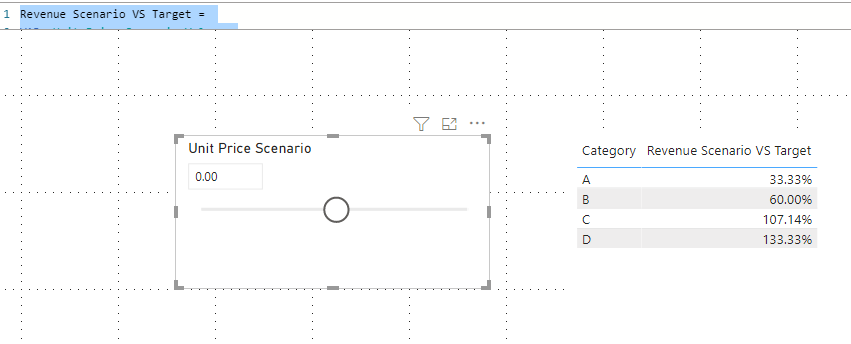
Best Regards,
Rico Zhou
If this post helps, then please consider Accept it as the solution to help the other members find it more quickly.
Hi @Anonymous
According to your statement, I think "Unit Price Scenario" is created by What if parameter option. Here I create a sample to have a test.
Revenue:
Target:
There is no relationship between two tables.
Measure:
Revenue Scenario VS Target =
VAR _Unit_Price_Scenario_Value =
SELECTEDVALUE ( 'Unit Price Scenario'[Unit Price Scenario] )
VAR _Revenue_Scenario =
SUM ( Revenue[Quantity of Items] ) * ( 1 + _Unit_Price_Scenario_Value )
* SUM ( Revenue[Unit Price] )
VAR _Target =
CALCULATE (
SUM ( Target[Target] ),
FILTER ( ALL ( Target ), Target[Category] = MAX ( Revenue[Category] ) )
)
RETURN
DIVIDE ( _Revenue_Scenario, _Target )
Result is as below.
Best Regards,
Rico Zhou
If this post helps, then please consider Accept it as the solution to help the other members find it more quickly.
@Anonymous , Not very clear. You need what if for Unit Price Scenario, what is issues all measures some wring values ?
The information you have provided is not making the problem clear to me. Can you please explain with an example.
Appreciate your Kudos.
| User | Count |
|---|---|
| 51 | |
| 38 | |
| 33 | |
| 22 | |
| 19 |
| User | Count |
|---|---|
| 136 | |
| 102 | |
| 59 | |
| 36 | |
| 35 |