Join us at FabCon Atlanta from March 16 - 20, 2026, for the ultimate Fabric, Power BI, AI and SQL community-led event. Save $200 with code FABCOMM.
Register now!Vote for your favorite vizzies from the Power BI Dataviz World Championship submissions. Vote now!
Hello
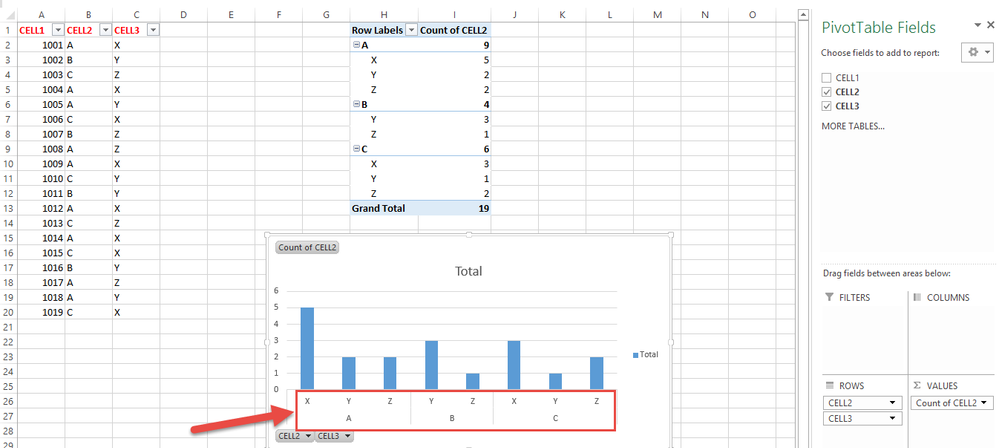
Can you help me ? how can i create a graphic on Power Bi Desktop like this. ?
Thank you
Solved! Go to Solution.
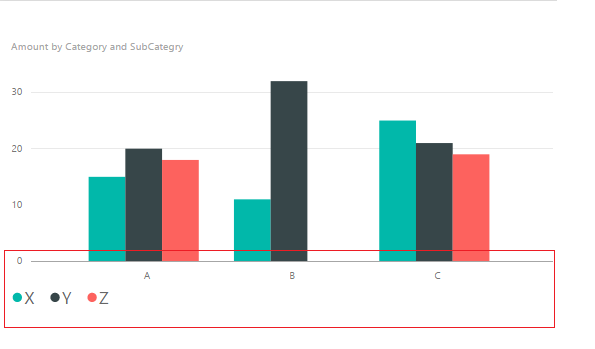
@zgrshn Current, you cannot display the X axis as that in Pivot table in Power BI desktop. In Power BI desktop, the X axis display as the screenshot below.
Regards,
@zgrshn Current, you cannot display the X axis as that in Pivot table in Power BI desktop. In Power BI desktop, the X axis display as the screenshot below.
Regards,
@zgrshn The closest equivalent to a pivot table in Power BI is the matrix visual. It uses the same setup with slots for rows, columns, and values.
Vote for your favorite vizzies from the Power BI World Championship submissions!
If you love stickers, then you will definitely want to check out our Community Sticker Challenge!
Check out the January 2026 Power BI update to learn about new features.
| User | Count |
|---|---|
| 58 | |
| 53 | |
| 43 | |
| 17 | |
| 16 |
| User | Count |
|---|---|
| 123 | |
| 108 | |
| 44 | |
| 32 | |
| 24 |