Join us at FabCon Atlanta from March 16 - 20, 2026, for the ultimate Fabric, Power BI, AI and SQL community-led event. Save $200 with code FABCOMM.
Register now!The Power BI Data Visualization World Championships is back! It's time to submit your entry. Live now!
Hello
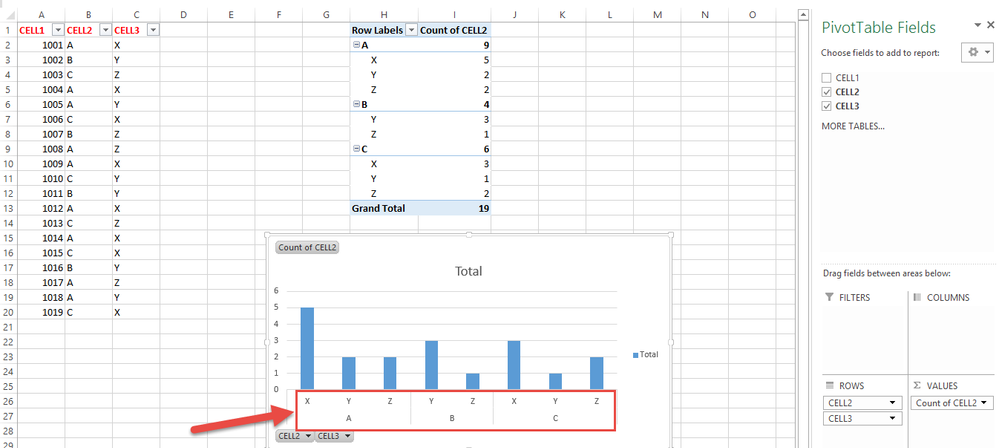
Can you help me ? how can i create a graphic on Power Bi Desktop like this. ?
Thank you
Solved! Go to Solution.
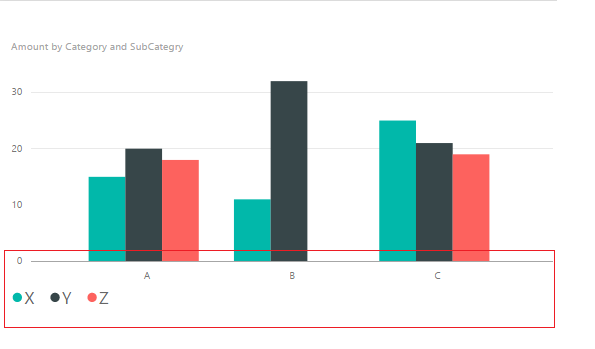
@zgrshn Current, you cannot display the X axis as that in Pivot table in Power BI desktop. In Power BI desktop, the X axis display as the screenshot below.
Regards,
@zgrshn Current, you cannot display the X axis as that in Pivot table in Power BI desktop. In Power BI desktop, the X axis display as the screenshot below.
Regards,
@zgrshn The closest equivalent to a pivot table in Power BI is the matrix visual. It uses the same setup with slots for rows, columns, and values.
Proud to be a Super User!
The Power BI Data Visualization World Championships is back! It's time to submit your entry.
| User | Count |
|---|---|
| 49 | |
| 43 | |
| 36 | |
| 33 | |
| 30 |
| User | Count |
|---|---|
| 138 | |
| 120 | |
| 60 | |
| 59 | |
| 56 |