Join us at FabCon Atlanta from March 16 - 20, 2026, for the ultimate Fabric, Power BI, AI and SQL community-led event. Save $200 with code FABCOMM.
Register now!The Power BI Data Visualization World Championships is back! Get ahead of the game and start preparing now! Learn more
Hi,
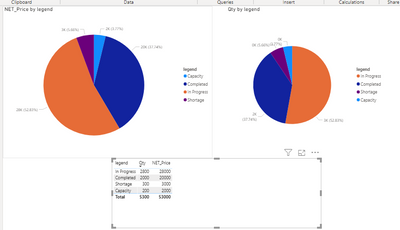
I have the below table with me and expecting a pie chart with legends and values as given below in another table.
I have Unique Sales ID with Order Qty and other fields.
NET Price should be given as Tool Tip.
I do not want many measures to be made as per the status or defect reasons, since the defect reasons may increase frequently.
Solved! Go to Solution.
Hi @Anonymous ,
Similar to the previous formula.
Best Regards,
Liang
If this post helps, then please consider Accept it as the solution to help the other members find it more quickly.
Hi @Anonymous ,
Similar to the previous formula.
Best Regards,
Liang
If this post helps, then please consider Accept it as the solution to help the other members find it more quickly.
@Anonymous , You can create qty column like
new column
Qty =
Switch( True(),
[Status] = "completed" , [Completed Qty],
[Status] = "In Progess" && isblank([Defect Reason]) , [In Progress Qty],
[Defect Qty]
)
Same way you can add Price column
You have given the formula to get Qty, how are we going to handle the legends which is two columns ?
The Power BI Data Visualization World Championships is back! Get ahead of the game and start preparing now!
| User | Count |
|---|---|
| 38 | |
| 38 | |
| 37 | |
| 28 | |
| 28 |
| User | Count |
|---|---|
| 124 | |
| 89 | |
| 73 | |
| 66 | |
| 65 |