Join us at FabCon Atlanta from March 16 - 20, 2026, for the ultimate Fabric, Power BI, AI and SQL community-led event. Save $200 with code FABCOMM.
Register now!The Power BI Data Visualization World Championships is back! Get ahead of the game and start preparing now! Learn more
Hi,
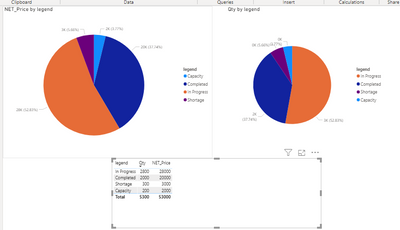
I have the below table with me and expecting a pie chart with legends and values as given below in another table.
I have Unique Sales ID with Order Qty and other fields.
NET Price should be given as Tool Tip.
I do not want many measures to be made as per the status or defect reasons, since the defect reasons may increase frequently.
Solved! Go to Solution.
Hi @Anonymous ,
Similar to the previous formula.
Best Regards,
Liang
If this post helps, then please consider Accept it as the solution to help the other members find it more quickly.
Hi @Anonymous ,
Similar to the previous formula.
Best Regards,
Liang
If this post helps, then please consider Accept it as the solution to help the other members find it more quickly.
@Anonymous , You can create qty column like
new column
Qty =
Switch( True(),
[Status] = "completed" , [Completed Qty],
[Status] = "In Progess" && isblank([Defect Reason]) , [In Progress Qty],
[Defect Qty]
)
Same way you can add Price column
You have given the formula to get Qty, how are we going to handle the legends which is two columns ?
The Power BI Data Visualization World Championships is back! Get ahead of the game and start preparing now!
Check out the November 2025 Power BI update to learn about new features.
| User | Count |
|---|---|
| 59 | |
| 43 | |
| 42 | |
| 23 | |
| 17 |
| User | Count |
|---|---|
| 190 | |
| 122 | |
| 96 | |
| 66 | |
| 47 |