cancel
Showing results for 
Search instead for 
Did you mean: 

Data Days is here! Join us now for 60+ days of learning, challenges, and connection. Learn more

Reply
Krcmajster
Helper IV
Helper IV

Paramaters changing

Hi, 


So I have a measure that I need to generates series:

Rent Par. = GENERATESERIES(0, 10000, 1)
I am using it with the slider and entry box. And it works how it should when I drag the slider, but when I manully enter data in the box like 243 it is being rounded up to 240 and I need it to be corrects.
It goes the same for below:
Rent Par. = GENERATESERIES(CURRENCY(0), CURRENCY(10000), CURRENCY(1))
 
Can someone point me to what I am doing wrong?
4 REPLIES 4
v-frfei-msft
Community Support
Community Support

Hi @Krcmajster ,


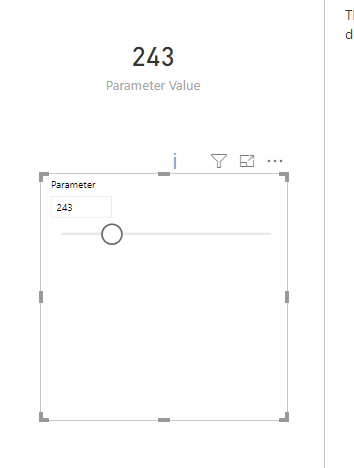
Based on my test using the Power BI desktop version : 2.67.5404.221 64-bit (March 2019). Could you please share more details about how did you create the what if parameter? I cannot reproduce your issue here. Could you please update your Power BI dekstop to the latest version to try again?


Capture.PNG

And kindly share your pbix to me to have a test here. Please upload your files to One Drive and share the link here.


Regards,

Frank

Community Support Team _ Frank
If this post helps, then please consider Accept it as the solution to help the others find it more quickly.

Unfortunatley I can't share the file as it contains confidential information. 

I have the latest version. It works when I use the slider like you did it, however, when I type in the box the number I get the previous problem. I don't want to use the slider, I just need this free entry box where I can put whatever number I need.


It works with smaller spans (0-500), but not with higher one (0-5,000, or like in my case 0-10,000)

Hi @Krcmajster ,


I didn't use the slider here, just entering the number in the box and no issue was found again. What kind of visual did you use here? Did you use the Slicer as I tested?


Regards,

Frank

Community Support Team _ Frank
If this post helps, then please consider Accept it as the solution to help the others find it more quickly.

@v-frfei-msft I create it with "what if" New Parameter. I have tried the same on on my coworkers laptop and it's the same.

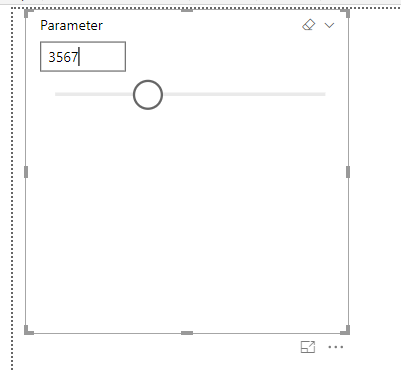
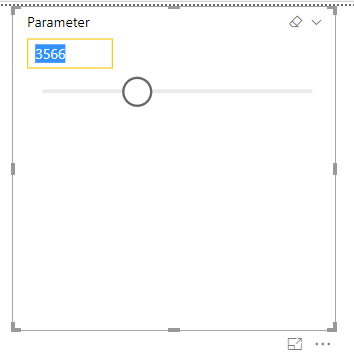
See below. I create it , I want to enter in this example 3567 and when I hit enter I get 3566.

2341 goes to 2428, 1534 goes to 1583 and so on

Parameter.png

PAR 1.png

PAR 2.pngq


Helpful resources

Announcements
Fabric Data Days is here Carousel

Fabric Data Days 2026

Don't miss out on Data Days, June 15 through August 7. Learn Fabric, Power BI, SQL, AI and more.

May Power BI Update Carousel

Power BI Monthly Update - May 2026

Check out the May 2026 Power BI update to learn about new features.

Power BI DataViz World Championships carousel

Power BI DataViz World Championships - June 2026

A new Power BI DataViz World Championship is coming this June! Don't miss out on submitting your entry.