This time we’re going bigger than ever. Fabric, Power BI, SQL, AI and more. We're covering it all. You won't want to miss it.
Learn moreLevel up your Power BI skills this month - build one visual each week and tell better stories with data! Get started
I need to raise a value in one column to the date diff of two other columns. I calculated the DATEDIFF in a separate calculated column. All of the column values are around 4. Then I tried to make a new calculated column that raised column values to the power of that date difference, but I get this error
"An argument of function 'POWER' has the wrong data type or the result is too large or too small."
All of my columns have the data type "decimal number"
Solved! Go to Solution.
The problem was that I had previously divided two columns and if a row had a missing value I was given an answer of infinity, which I then tried to use in the POWER function
Hi @heardm
Could you please mark the proper answer if it's convenient for you? That will be a help to others.
Best Regards!
Dale
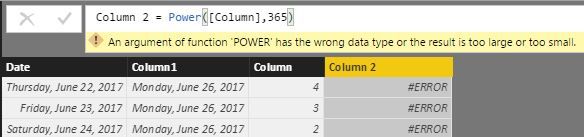
That error can be caused by having too large of a number in 2nd argument of POWER function as well.
See image for an example.
Check out the April 2026 Power BI update to learn about new features.
Sign up to receive a private message when registration opens and key events begin.
If you have recently started exploring Fabric, we'd love to hear how it's going. Your feedback can help with product improvements.
| User | Count |
|---|---|
| 37 | |
| 32 | |
| 27 | |
| 24 | |
| 17 |
| User | Count |
|---|---|
| 70 | |
| 50 | |
| 31 | |
| 26 | |
| 22 |