Don't miss your chance to take the Fabric Data Engineer (DP-700) exam on us!
Learn moreNext up in the FabCon + SQLCon recap series: The roadmap for Microsoft SQL and Maximizing Developer experiences in Fabric. All sessions are available on-demand after the live show. Register now
Hello PBI Community...
I have a question that I don’t even know is possible.
I have a report in PBI desktop and I want there to be buttons (potentially a slicer) to show the income either for last week or the year to date (YTD). Clearly last week is a subset of YTD so the two options in the slicer are not unique... is this possible or can someone come up with a work around, I’m reasonably new to PBI so don’t know all the tricks of the trade yet.
My initial work around was to have a slicer with 'last week' and 'YTD excluding last week', and people would have to use 'select all' to see the full YTD. But as I build these reports for other teams, I noticed that the team were using it incorrectly as it’s not very intuitive (they were just selecting the YTD minus last week as the full YTD).
Please help,
Thanks.
Harriet.
Solved! Go to Solution.
I'd do a disconnected table/switch combination that looks like this:
Step #1 Create a disconnected table:
Number Chooser
0 YTD
1 Last Week
Step 2 the measure
= Switch(min(DisconnectedTable[Number]),
0,[Calculation #1],
1,[Calculation #2])
Step 3. Bring the Chooser column, from the disconnected table, on to the pivot as a slicer. When you select YTD, the min will filter to 0, and the switch will run calc #1. When you select Last Week, the min will filter to 1, and the switch will run calc#2
Essentially you make two distinct calcs, one that does YTD, and another that does last week. Then the switch will toggle between them.
Does this help?
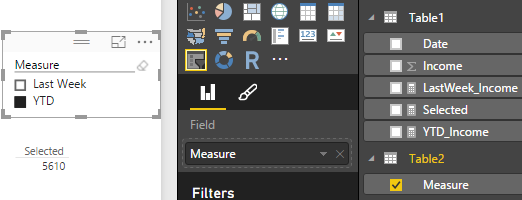
In this scenario, you can first create two measures for YTD and Last Week. Then create another new table for these two measures. So that either of the measures can be selected in the slicer and you can get the expected result.
Please refer to following steps:
YTD_Income = CALCULATE ( SUM ( Table1[Income] ), DATESYTD ( Table1[Date] ) )
LastWeek_Income =
VAR LastDay = LASTDATE ( Table1[Date] )
VAR WeekDayNum = WEEKDAY ( LastDay )
RETURN
(
CALCULATE (
SUM ( Table1[Income] ),
FILTER (
ALL ( Table1[Date] ),
Table1[Date] > LastDay - 7 - WeekDayNum
&& Table1[Date] <= LastDay - WeekDayNum
)
)
)
Regards,
I'd do a disconnected table/switch combination that looks like this:
Step #1 Create a disconnected table:
Number Chooser
0 YTD
1 Last Week
Step 2 the measure
= Switch(min(DisconnectedTable[Number]),
0,[Calculation #1],
1,[Calculation #2])
Step 3. Bring the Chooser column, from the disconnected table, on to the pivot as a slicer. When you select YTD, the min will filter to 0, and the switch will run calc #1. When you select Last Week, the min will filter to 1, and the switch will run calc#2
Essentially you make two distinct calcs, one that does YTD, and another that does last week. Then the switch will toggle between them.
Does this help?
Thanks!
Harriet.
Hi. make a calculated column with either current week or YTD. something like:
if(now()>week_start_date, = "current_week",if(now()-365>week_start_date,"YTD","other")).
use that in your slicer and you will get either YTD or last_wk or other
If you have recently started exploring Fabric, we'd love to hear how it's going. Your feedback can help with product improvements.
A new Power BI DataViz World Championship is coming this June! Don't miss out on submitting your entry.
Share feedback directly with Fabric product managers, participate in targeted research studies and influence the Fabric roadmap.
| User | Count |
|---|---|
| 50 | |
| 44 | |
| 42 | |
| 19 | |
| 19 |
| User | Count |
|---|---|
| 69 | |
| 68 | |
| 33 | |
| 32 | |
| 32 |