Learn from the best! Meet the four finalists headed to the FINALS of the Power BI Dataviz World Championships! Register now
Hello BI developers,
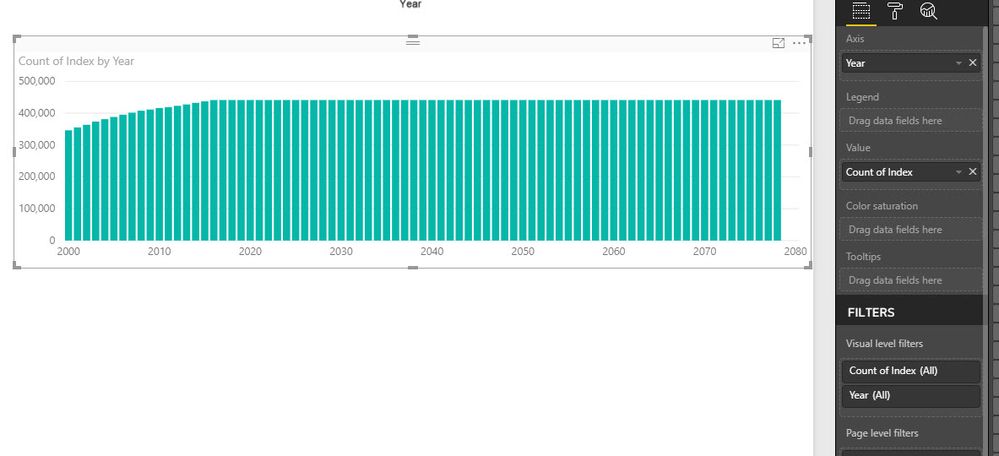
I came across a strage situation which does not make sense. I am sure I am doing somethign wrong but I cannot figure it out. I have a dataset (very huge) and need to do some visulisation. I need to some part in R to make the life easier, but the outputs are different even for the simpleset scanrio which is counting the rows. I have added an Index (auto increment) from Power BI to avoid any possible removal of duplicate rows.
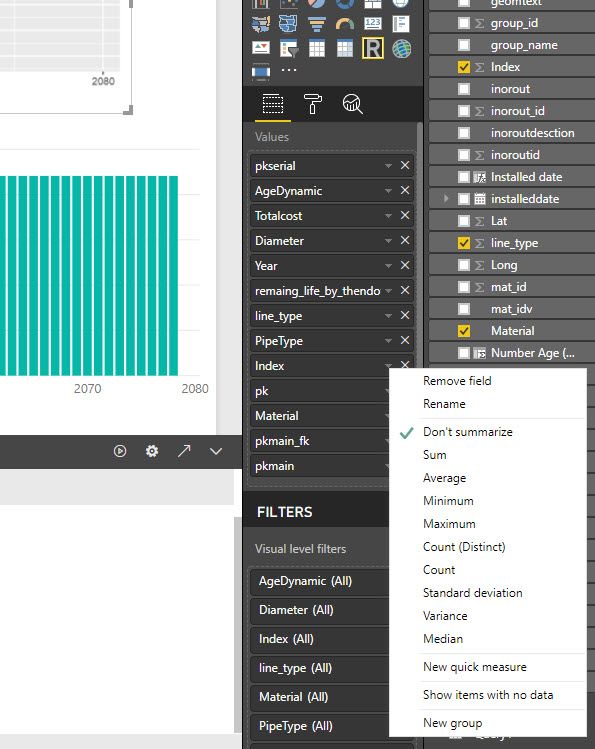
All the values in the R script have "Don't summarize", but still the values (the count) are different. Please see the screenshots. If you need more information please let me know.
library(sqldf)
library(ggplot2)
options(scipen=999)
datas=sqldf("select count() as tc, Year from dataset group by Year ")
ggplot(datas, aes(x = Year, y = tc)) + geom_line()
Solved! Go to Solution.
Hi @mohsenhs82,
I can reproduce the same result. But I'm afraid this is a limitation of R visual in Power BI. Please refer to desktop-r-visuals#known-limitations. If I reduce the size of data to less than 150000, it's good.
Best Regards,
Dale
Hi @mohsenhs82,
I can reproduce the same result. But I'm afraid this is a limitation of R visual in Power BI. Please refer to desktop-r-visuals#known-limitations. If I reduce the size of data to less than 150000, it's good.
Best Regards,
Dale
Thank you Dale,
I see, when I plotted the total number of rows in my R scipt I saw 150k. I was suprised as I have millions of records. so this is the limitation. what a shame, but at least I know, and thanks for the link too.
Thanks
M
A new Power BI DataViz World Championship is coming this June! Don't miss out on submitting your entry.
Share feedback directly with Fabric product managers, participate in targeted research studies and influence the Fabric roadmap.
| User | Count |
|---|---|
| 45 | |
| 35 | |
| 30 | |
| 15 | |
| 15 |
| User | Count |
|---|---|
| 58 | |
| 55 | |
| 38 | |
| 21 | |
| 21 |