This time we’re going bigger than ever. Fabric, Power BI, SQL, AI and more. We're covering it all. You won't want to miss it.
Learn moreLevel up your Power BI skills this month - build one visual each week and tell better stories with data! Get started
Hello,
I have 3 columns (levels) and each column has a Order column,i want to sort teh column but the problem is my columns have duplicates values like that:
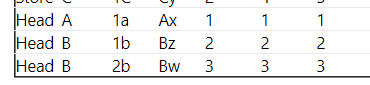
| Group | Level 1 | level 2 | level 3 | Order 1 | Order 2 | Order 3 |
| Store | A | 1a | Ax | 1 | 1 | 2 |
| Store | B | 1b | Bx | 3 | 2 | 1 |
| Store | B | 2b | By | 3 | 3 | 3 |
| Store | C | 1c | Cx | 2 | 4 | 4 |
| Store | C | 1C | Cy | 2 | 4 | 5 |
| Head | A | 1a | Ax | 1 | 1 | 1 |
| Head | B | 1b | Bz | 2 | 2 | 2 |
| Head | B | 2b | Bw | 3 | 3 | 3 |
I create duplicates columns, concatenate group and level to remove duplicates values in each column and sort by Orders columns. But with this solution I have to display Group/Level 1 ( Head/A, Head/B, Store/A,Store B,....), Group/Level 2,... and I want to display only the level without .
Do you have any other ideas?
Thank you for your help
Anyone else have an idea?
If i do this , the same level will have to Order value and it's not gonna working . Example: Lveal 1a will have 1 and 4 as order position power bi won't understand.
Check out the April 2026 Power BI update to learn about new features.
Sign up to receive a private message when registration opens and key events begin.
If you have recently started exploring Fabric, we'd love to hear how it's going. Your feedback can help with product improvements.
| User | Count |
|---|---|
| 37 | |
| 28 | |
| 28 | |
| 23 | |
| 18 |
| User | Count |
|---|---|
| 66 | |
| 36 | |
| 29 | |
| 25 | |
| 24 |