Don't miss your chance to take the Fabric Data Engineer (DP-600) exam for FREE! Find out how by attending the DP-600 session on April 23rd (pacific time), live or on-demand.
Learn moreNext up in the FabCon + SQLCon recap series: The roadmap for Microsoft SQL and Maximizing Developer experiences in Fabric. All sessions are available on-demand after the live show. Register now
Hello,
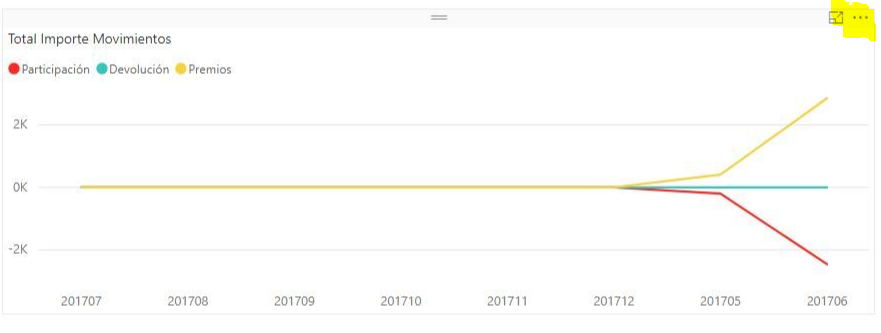
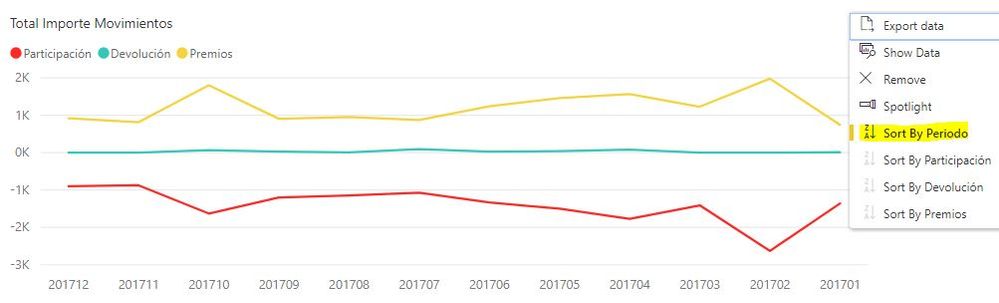
I have an issue ordering the axis on the following visualizations:
Both visualizations are the same type and the information displayed is from the same table.
Now, Is there a way or a property which could be set for ordering the Axis data?, as I am working in a DirectMode query the "Sort by Column" option from the Modeling menu is not avalaible.
Any help is appreciated.
BR
Solved! Go to Solution.
Hello @Anonymous , thanks for your recomendation.
I did not notice the options of the chart on the 3 dots, I supposed it was a configuration defined at the format or value properties of the visualization.
But looking at the options of the chart:
About the last statement, I guess is a limitation of this "visualization", to me is easier to read from de lowest value to the left to the higuest to the right.
If you have recently started exploring Fabric, we'd love to hear how it's going. Your feedback can help with product improvements.
A new Power BI DataViz World Championship is coming this June! Don't miss out on submitting your entry.
| User | Count |
|---|---|
| 47 | |
| 44 | |
| 39 | |
| 20 | |
| 15 |
| User | Count |
|---|---|
| 70 | |
| 68 | |
| 32 | |
| 27 | |
| 25 |