Forum Discussion
Anonymous
8 years agoNot applicable
Omitting Blank Fields?
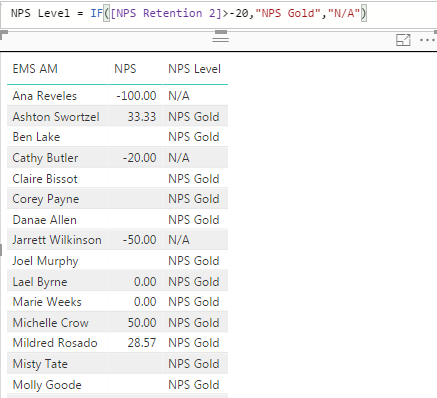
What do I have to do to my formula to ensure that people who have blank values don't get any value for NPS Level? If they have no values they shouldn't be assigned "NPS Gold":
- Anonymous8 years ago
Anonymous,
you can use this formula
NPS Level = SWITCH(TRUE(), [NPS Retention 2] = BLANK(), BLANK(), [NPS Retention 2] > -20, "NPS Gold", "N/A")
3 Replies
- AnonymousNot applicable
Anonymous,
you can use this formula
NPS Level = SWITCH(TRUE(), [NPS Retention 2] = BLANK(), BLANK(), [NPS Retention 2] > -20, "NPS Gold", "N/A")
- AnonymousNot applicable
Hey Anonymous
Maybe try something like:
NPS Level = IF( NOT(ISBLANK(NPS Retention 2])), IF( [NPS Retention 2] > - 20, "NPS Gold", "N/A" ), BLANK() )Hope this helps,
Parker
- AnonymousNot applicable
Anonymous Anonymous Thanks to both of you! Tried out both ways and they both work.