Join us at FabCon Atlanta from March 16 - 20, 2026, for the ultimate Fabric, Power BI, AI and SQL community-led event. Save $200 with code FABCOMM.
Register now!The Power BI Data Visualization World Championships is back! Get ahead of the game and start preparing now! Learn more
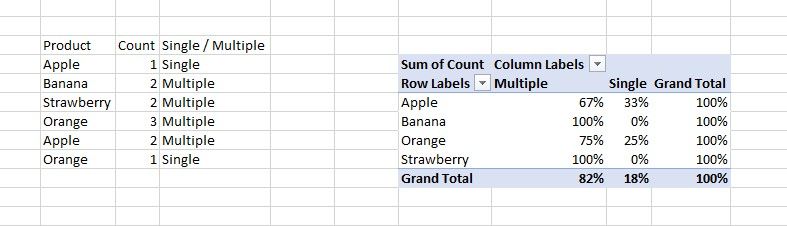
I have this database as per below, with product count of product and if the product is single (only one) or multiple (=>2).
In Excel, I can easily use the total % per role and get the information I need (as per below too), but I don't know how to that that in PBI. Can you please help?
Solved! Go to Solution.
Hi, @mglomb
If you use matrix visual, you can create a measure.
Like this:
Measure =
VAR a =
CALCULATE (
SUM ( 'Table'[Count] )
)
VAR b =
CALCULATE (
SUM ( 'Table'[Count] ),
FILTER (ALL( 'Table'), [Product]=SELECTEDVALUE('Table'[Product]))
)
RETURN
a/b
Multiple =
VAR a =
CALCULATE (
SUM ( 'Table'[Count] ),
FILTER ( 'Table', [Single/Multiple] = "Single" )
)
VAR b =
CALCULATE (
SUM ( 'Table'[Count] ),
FILTER ( 'Table', [Single/Multiple] = "Multiple" )
)
RETURN
b / ( a + b )
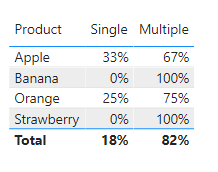
Since the values of non-existent rows can't be displayed in the matrix in powerbi, 0% can't be displayed.
But if you use table visual, it can be displayed.
Like this:
Single =
VAR a =
CALCULATE (
SUM ( 'Table'[Count] ),
FILTER ( 'Table', [Single/Multiple] = "Single" )
)
VAR b =
CALCULATE (
SUM ( 'Table'[Count] ),
FILTER ( 'Table', [Single/Multiple] = "Multiple" )
)
RETURN
a / ( a + b )+0
Did I answer your question ? Please mark my reply as solution. Thank you very much.
If not, please feel free to ask me.
Best Regards,
Community Support Team _ Janey
Hi, @mglomb
If you use matrix visual, you can create a measure.
Like this:
Measure =
VAR a =
CALCULATE (
SUM ( 'Table'[Count] )
)
VAR b =
CALCULATE (
SUM ( 'Table'[Count] ),
FILTER (ALL( 'Table'), [Product]=SELECTEDVALUE('Table'[Product]))
)
RETURN
a/b
Multiple =
VAR a =
CALCULATE (
SUM ( 'Table'[Count] ),
FILTER ( 'Table', [Single/Multiple] = "Single" )
)
VAR b =
CALCULATE (
SUM ( 'Table'[Count] ),
FILTER ( 'Table', [Single/Multiple] = "Multiple" )
)
RETURN
b / ( a + b )
Since the values of non-existent rows can't be displayed in the matrix in powerbi, 0% can't be displayed.
But if you use table visual, it can be displayed.
Like this:
Single =
VAR a =
CALCULATE (
SUM ( 'Table'[Count] ),
FILTER ( 'Table', [Single/Multiple] = "Single" )
)
VAR b =
CALCULATE (
SUM ( 'Table'[Count] ),
FILTER ( 'Table', [Single/Multiple] = "Multiple" )
)
RETURN
a / ( a + b )+0
Did I answer your question ? Please mark my reply as solution. Thank you very much.
If not, please feel free to ask me.
Best Regards,
Community Support Team _ Janey
@mglomb , Try a measure like
divide(sum(Table[Count]), calculate(sum(Table[Count]), filter(allselected(table), Table[product] = max(Table[Product]))))
I got an error message saying that are "Too many arguments were passed to the Sum function. The maximum argument count for the function is 1".
Check out the November 2025 Power BI update to learn about new features.
Advance your Data & AI career with 50 days of live learning, contests, hands-on challenges, study groups & certifications and more!