This is best Fabric, Power BI, SQL and AI community event. How do we know? The last event sold out! Save €200 with code FABCMTY200.
Register nowA new Data Days event is coming soon! This time we’re going bigger than ever. Fabric, Power BI, SQL, AI and more. Don't miss out.
similart to this thread, however i want to know if there is a way to have these customers grouped
https://community.powerbi.com/t5/Desktop/Not-Selected-Values/m-p/572530#M270416
Table1 has Column CUST and another Table2 Column CUST in groups.
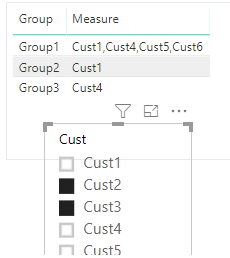
Slicer is PIN to CUST Column in Table 1, if User selects multiple value such as CUST1, CUST5, CUST 8,.....etc. Is there a way to list rest of the not selected values based on the grouping of these customers?
here is the link to the file
https://www.dropbox.com/s/1fg0pvc3ptkd7tv/Not%20Selected%20Values.pbix?dl=0
Thanks
Solved! Go to Solution.
Hi @powerBIpeon
You may try below measure:
Measure =
CONCATENATEX (
FILTER (
Table2,
Table2[Group] = MAX ( Table2[Group] )
&& NOT ( Table2[Cust] ) IN VALUES ( Table1[Cust] )
),
Table2[Cust],
","
)
Regards,
Cherie
Maybe, seems like you could borrow the concept from my Inverse Aggregator which was created to do something similar:
https://community.powerbi.com/t5/Quick-Measures-Gallery/Inverse-Aggregator/m-p/342266
@Greg_Deckler - the formula does work, but its repeating the the non-selected customer multiple times in the group. I changed the SUM to CONCATENATEX
InverseSum = IF(
ISFILTERED('InverseAggregator'[Category]),
CALCULATE(
CONCATENATEX('InverseAggregator'[Value]),
EXCEPT(
ALL('InverseAggregator'[Category]),
VALUES('InverseAggregator'[Category])
)
),
CONCATENATEX('InverseAggregator'[Value])
)
This is what the output is when CUST1 is not selected.
Group1 - CUST1 CUST1 CUST1 CUST1 CUST1
Hi @powerBIpeon
You may try below measure:
Measure =
CONCATENATEX (
FILTER (
Table2,
Table2[Group] = MAX ( Table2[Group] )
&& NOT ( Table2[Cust] ) IN VALUES ( Table1[Cust] )
),
Table2[Cust],
","
)
Regards,
Cherie
Thank you both for the help!
OK, I'll have to take a look at it.
Check out the May 2026 Power BI update to learn about new features.
Sign up to receive a private message when registration opens and key events begin.
If you have recently started exploring Fabric, we'd love to hear how it's going. Your feedback can help with product improvements.
| User | Count |
|---|---|
| 27 | |
| 25 | |
| 25 | |
| 21 | |
| 14 |
| User | Count |
|---|---|
| 51 | |
| 46 | |
| 23 | |
| 18 | |
| 18 |