cancel
Showing results for 
Search instead for 
Did you mean: 

Data Days is here! Join us now for 60+ days of learning, challenges, and connection. Learn more

Reply
powerBIpeon
Helper II
Helper II

Not Selected Values

similart to this thread, however i want to know if there is a way to have these customers grouped

https://community.powerbi.com/t5/Desktop/Not-Selected-Values/m-p/572530#M270416


Table1 has Column CUST and another Table2 Column CUST in groups.

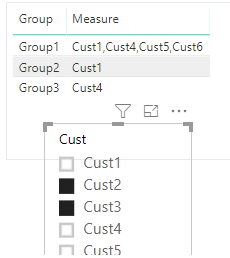
Slicer is PIN to CUST Column in Table 1, if User selects multiple value such as CUST1, CUST5, CUST 8,.....etc. Is there a way to list rest of the not selected values based on the grouping of these customers?


here is the link to the file


https://www.dropbox.com/s/1fg0pvc3ptkd7tv/Not%20Selected%20Values.pbix?dl=0


Thanks

1 ACCEPTED SOLUTION

Hi @powerBIpeon


You may try below measure:

Measure =
CONCATENATEX (
    FILTER (
        Table2,
        Table2[Group] = MAX ( Table2[Group] )
            && NOT ( Table2[Cust] ) IN VALUES ( Table1[Cust] )
    ),
    Table2[Cust],
    ","
)

1.png

Regards,

Cherie

Community Support Team _ Cherie Chen
If this post helps, then please consider Accept it as the solution to help the other members find it more quickly.

View solution in original post

5 REPLIES 5
Greg_Deckler
Community Champion
Community Champion

Maybe, seems like you could borrow the concept from my Inverse Aggregator which was created to do something similar:


https://community.powerbi.com/t5/Quick-Measures-Gallery/Inverse-Aggregator/m-p/342266


Follow on LinkedIn
@ me in replies or I'll lose your thread!!!
Instead of a Kudo, please vote for this idea
Become an expert!: Enterprise DNA
External Tools: MSHGQM
YouTube Channel!: Microsoft Hates Greg
Latest book!:
DAX For Humans

DAX is easy, CALCULATE makes DAX hard...

@Greg_Deckler - the formula does work, but its repeating the the non-selected customer multiple times in the group. I changed the SUM to CONCATENATEX

InverseSum = IF(
                            ISFILTERED('InverseAggregator'[Category]),
                            CALCULATE(
                                                CONCATENATEX('InverseAggregator'[Value]),
                                                EXCEPT(
                                                             ALL('InverseAggregator'[Category]),
                                                             VALUES('InverseAggregator'[Category])
                                                 )
                            ),
                            CONCATENATEX('InverseAggregator'[Value])
                        )


This is what the output is when CUST1 is not selected. 

Group1 - CUST1 CUST1 CUST1 CUST1 CUST1

Hi @powerBIpeon


You may try below measure:

Measure =
CONCATENATEX (
    FILTER (
        Table2,
        Table2[Group] = MAX ( Table2[Group] )
            && NOT ( Table2[Cust] ) IN VALUES ( Table1[Cust] )
    ),
    Table2[Cust],
    ","
)

1.png

Regards,

Cherie

Community Support Team _ Cherie Chen
If this post helps, then please consider Accept it as the solution to help the other members find it more quickly.

Thank you both for the help!

OK, I'll have to take a look at it.


Follow on LinkedIn
@ me in replies or I'll lose your thread!!!
Instead of a Kudo, please vote for this idea
Become an expert!: Enterprise DNA
External Tools: MSHGQM
YouTube Channel!: Microsoft Hates Greg
Latest book!:
DAX For Humans

DAX is easy, CALCULATE makes DAX hard...

Helpful resources

Announcements
Fabric Data Days is here Carousel

Fabric Data Days 2026

Don't miss out on Data Days, June 15 through August 7. Learn Fabric, Power BI, SQL, AI and more.

May Power BI Update Carousel

Power BI Monthly Update - May 2026

Check out the May 2026 Power BI update to learn about new features.

Power BI DataViz World Championships carousel

Power BI DataViz World Championships - June 2026

A new Power BI DataViz World Championship is coming this June! Don't miss out on submitting your entry.