cancel
Showing results for 
Search instead for 
Did you mean: 

The Fabric community is upgrading! Read all of the details including the timeline and what you can expect. Learn more

Reply
parzival1220
Frequent Visitor

New Column with Power Query

Hi there,


Apologies I'm a bit new to Power Query 😑. I'm trying to create a new column that will return a Y or an N depending on whether a date is greater than another date. Both date columns I want to use are in date/time format, but the second date does contain some 'null' values (see below). 
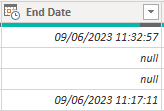
 

parzival1220_0-1686559772545.png

I need to account for these by stating 'not closed' or similar. I've had a go with a couple of scripts to get the datediff working but both give me syntax errors (see screenshot below):


1. SLA Breach = if ('EasyVista Incidents'[End Date] > 'EasyVista Incidents[SLA Target] , "true","false")

2. Table.AddColumn(#"EasyVista Incidents", "Custom", each if, [End Date] > [SLA Target] then true else false)
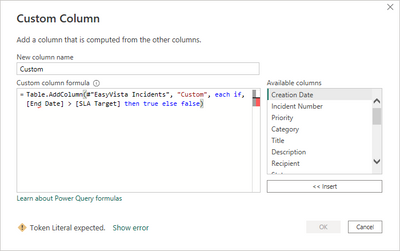
 

parzival1220_0-1686570685090.png

I'm just not quite sure what I;ve done wrong. Any help would be greatly appreciated, TIA 😀

1 ACCEPTED SOLUTION
Shubham_Tekade
Frequent Visitor

Hello @parzival1220 ,

Refer to below blog - https://goodly.co.in/if-function-power-query/

it will help you to fix your problem.

Thanks,

Shubham


View solution in original post

2 REPLIES 2
parzival1220
Frequent Visitor

Thanks very much @Shubham_Tekade. Solves the problem perfectly. 😀

Shubham_Tekade
Frequent Visitor

Hello @parzival1220 ,

Refer to below blog - https://goodly.co.in/if-function-power-query/

it will help you to fix your problem.

Thanks,

Shubham


Helpful resources

Announcements
FabCon and SQLCon Barcelona 2026

FabCon & SQLCon – Barcelona 2026

Join us in Barcelona for FabCon and SQLCon, the Fabric, Power BI, SQL, and AI community event. Save €200 with code FABCMTY200.

Power BI DataViz World Championships carousel

Power BI DataViz World Championships - June 2026

A new Power BI DataViz World Championship is coming this June! Don't miss out on submitting your entry.