Join us at FabCon Atlanta from March 16 - 20, 2026, for the ultimate Fabric, Power BI, AI and SQL community-led event. Save $200 with code FABCOMM.
Register now!Learn from the best! Meet the four finalists headed to the FINALS of the Power BI Dataviz World Championships! Register now
Hi there,
Apologies I'm a bit new to Power Query 😑. I'm trying to create a new column that will return a Y or an N depending on whether a date is greater than another date. Both date columns I want to use are in date/time format, but the second date does contain some 'null' values (see below).
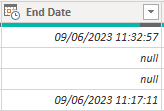
I need to account for these by stating 'not closed' or similar. I've had a go with a couple of scripts to get the datediff working but both give me syntax errors (see screenshot below):
1. SLA Breach = if ('EasyVista Incidents'[End Date] > 'EasyVista Incidents[SLA Target] , "true","false")
2. Table.AddColumn(#"EasyVista Incidents", "Custom", each if, [End Date] > [SLA Target] then true else false)
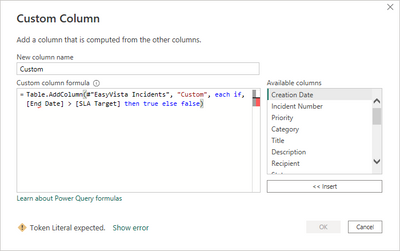
I'm just not quite sure what I;ve done wrong. Any help would be greatly appreciated, TIA 😀
Solved! Go to Solution.
Hello @parzival1220 ,
Refer to below blog - https://goodly.co.in/if-function-power-query/
it will help you to fix your problem.
Thanks,
Shubham
Hello @parzival1220 ,
Refer to below blog - https://goodly.co.in/if-function-power-query/
it will help you to fix your problem.
Thanks,
Shubham
Share feedback directly with Fabric product managers, participate in targeted research studies and influence the Fabric roadmap.
Check out the February 2026 Power BI update to learn about new features.
| User | Count |
|---|---|
| 65 | |
| 59 | |
| 45 | |
| 19 | |
| 15 |
| User | Count |
|---|---|
| 109 | |
| 108 | |
| 39 | |
| 30 | |
| 26 |