Get certified for free when you join Fabric Data Days 2026 and dive into Fabric, Power BI, SQL, AI, and other essential data skills.
Join nowTry your skills in the Power BI Dataviz World Championship! Round one ends June 26. Join now
Hi all,
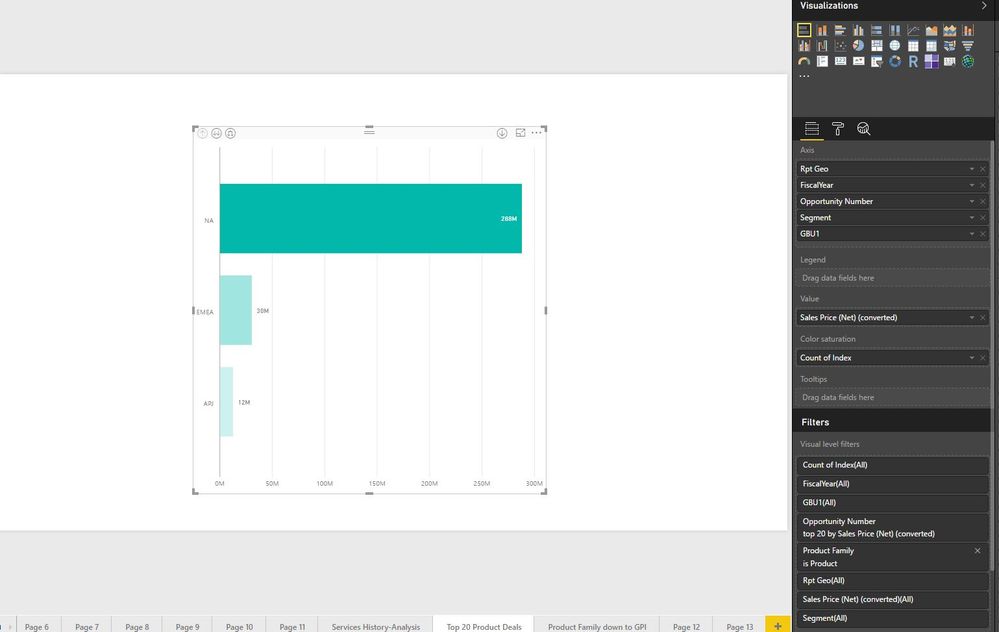
I'm struggling with something seamingly easy. I want to show the top 20 opportunities by sales $ per region. As per attached below, when I filter the TOP N opportunities (count) it filters all the opportunities based on the top 30 sales but how could I do a nested sorting to show teh top 30 opps by sales per region?
Solved! Go to Solution.
Hi @harrinho,
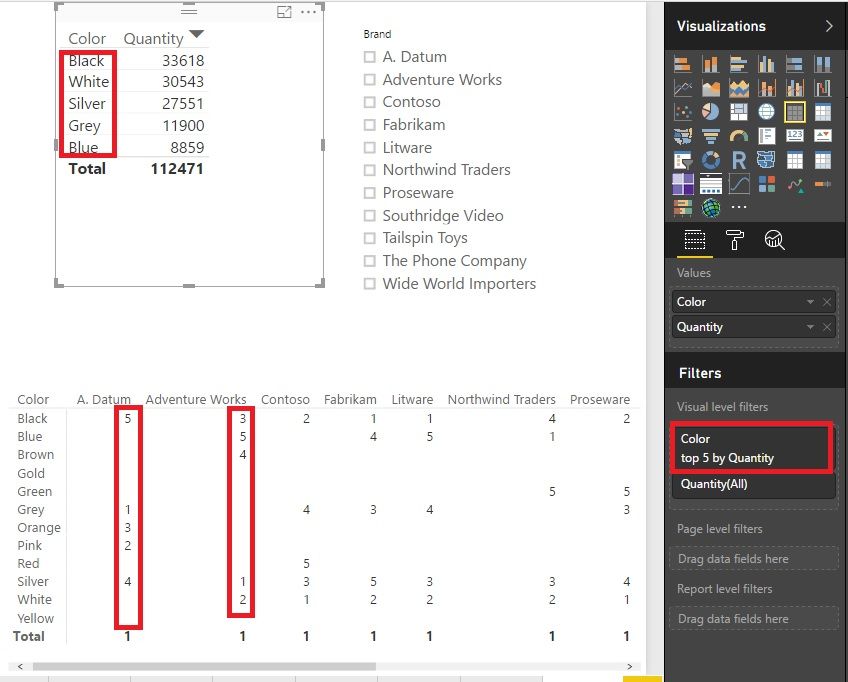
I think we just need a region slicer and a filter of top N = 5. Have look at the picture. It's similar with this scenario. In the upper part, the top 5 colors will show up if we choose a brand. In the bottom of the picture, if we want to show all the top 5, it would be not that clear.
BTW, it's a measure in the bottom part.
4Measure = RANKX ( ALL ( 'Product'[Color] ), CALCULATE ( SUM ( Sales[Quantity] ) ) )
5Measure = IF ( [4Measure] <= 5, [4Measure], BLANK () )
Best Regards!
Dale
Hi @harrinho,
Could you please mark the proper answer if it's convenient for you? That will be a help to others.
Best Regards!
Dale
Hi @harrinho,
I think we just need a region slicer and a filter of top N = 5. Have look at the picture. It's similar with this scenario. In the upper part, the top 5 colors will show up if we choose a brand. In the bottom of the picture, if we want to show all the top 5, it would be not that clear.
BTW, it's a measure in the bottom part.
4Measure = RANKX ( ALL ( 'Product'[Color] ), CALCULATE ( SUM ( Sales[Quantity] ) ) )
5Measure = IF ( [4Measure] <= 5, [4Measure], BLANK () )
Best Regards!
Dale
| User | Count |
|---|---|
| 23 | |
| 21 | |
| 20 | |
| 17 | |
| 11 |
| User | Count |
|---|---|
| 55 | |
| 53 | |
| 41 | |
| 36 | |
| 32 |