Get certified for free when you join Fabric Data Days 2026 and dive into Fabric, Power BI, SQL, AI, and other essential data skills.
Join nowJuly 7 - July 17 | Round 2 of the Power BI Dataviz World Championships. Don't miss your chance! Learn more
Hi all,
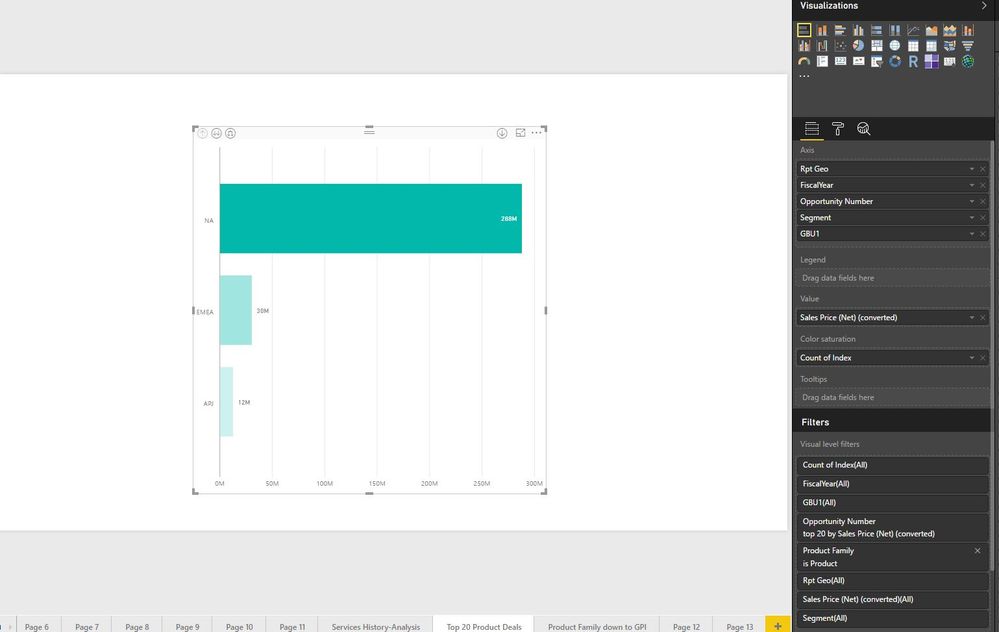
I'm struggling with something seamingly easy. I want to show the top 20 opportunities by sales $ per region. As per attached below, when I filter the TOP N opportunities (count) it filters all the opportunities based on the top 30 sales but how could I do a nested sorting to show teh top 30 opps by sales per region?
Solved! Go to Solution.
Hi @harrinho,
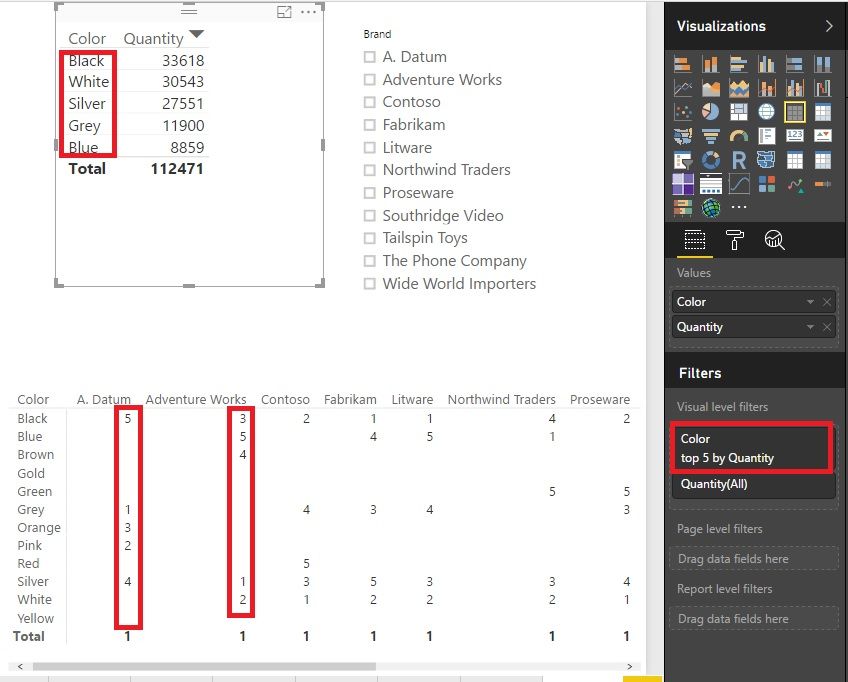
I think we just need a region slicer and a filter of top N = 5. Have look at the picture. It's similar with this scenario. In the upper part, the top 5 colors will show up if we choose a brand. In the bottom of the picture, if we want to show all the top 5, it would be not that clear.
BTW, it's a measure in the bottom part.
4Measure = RANKX ( ALL ( 'Product'[Color] ), CALCULATE ( SUM ( Sales[Quantity] ) ) )
5Measure = IF ( [4Measure] <= 5, [4Measure], BLANK () )
Best Regards!
Dale
Hi @harrinho,
Could you please mark the proper answer if it's convenient for you? That will be a help to others.
Best Regards!
Dale
Hi @harrinho,
I think we just need a region slicer and a filter of top N = 5. Have look at the picture. It's similar with this scenario. In the upper part, the top 5 colors will show up if we choose a brand. In the bottom of the picture, if we want to show all the top 5, it would be not that clear.
BTW, it's a measure in the bottom part.
4Measure = RANKX ( ALL ( 'Product'[Color] ), CALCULATE ( SUM ( Sales[Quantity] ) ) )
5Measure = IF ( [4Measure] <= 5, [4Measure], BLANK () )
Best Regards!
Dale
Join us in Barcelona for FabCon and SQLCon, the Fabric, Power BI, SQL, and AI community event. Save €200 with code FABCMTY200.
Join Fabric Data Days 2026: 60 days of free live/on-demand sessions, challenges, study groups, and certification opportunities.
| User | Count |
|---|---|
| 23 | |
| 19 | |
| 18 | |
| 17 | |
| 13 |
| User | Count |
|---|---|
| 60 | |
| 52 | |
| 47 | |
| 40 | |
| 38 |