Don't miss your chance to take the Fabric Data Engineer (DP-600) exam for FREE! Find out how by watching the DP-600 session on-demand now through April 28th.
Learn moreJoin the FabCon + SQLCon recap series. Up next: Power BI, Real-Time Intelligence, IQ and AI, and Data Factory take center stage. All sessions are available on-demand after the live show. Register now
Hello,
I have the following situation in Power Query.
A fact table that has foreign keys to multiple dimensions.
eg.
ID_Fact ID_FK1 ID_FK2 value
| 1 | 2 | 3 | 4 |
| 1 | FK1_1 | FK2_1 | 100 |
| 2 | FK1_1 | FK2_1 | 50 |
| 3 | FK1_2 | FK2_1 | 70 |
I want to merge the fact table with the dimension tables based on the ID's.
The caveat however is I want to do this dynamically.
So if in the fact table a new foreign key is added, it should join that new table as well, without having to change the query.
How do I know which column is a foreign key? Because this is data entered in a different table:
FK Columns
| FK1_ID |
| FK2_ID |
So what I want to do, is to join the fact table with every table present in the foreign key list-table.
For simplicity, you can assume that all tables and columns have the same naming convention and that all columns required are present.
So if in the above table the value 'FK3_ID' is added, it should join the fact with the new table 'FK3' on the 'FK3_ID' column.
I'm confident the key lies in using a recursive query, but I'm unsuccessful.
Thank you.
Solved! Go to Solution.
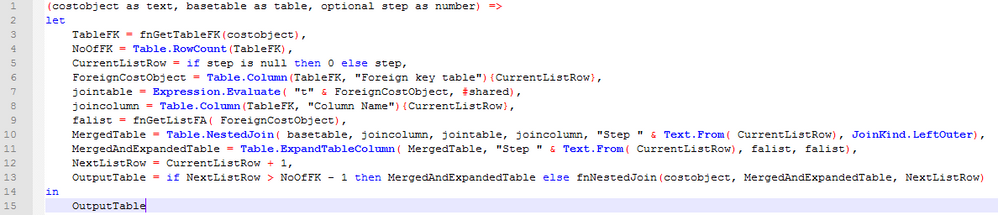
Thanks for the reply, I'm happy to say I managed to obtain the result I needed, using Evaluate.Expression to retrieve the tables from the text names of the tables linked...
No, it's not possible to dynamically nested join tables. Even we can substring the values from FK columns, it's still not supported to get a table or list with its name in Power Query. So for your requirement, it can't be achieved with recursive function.
Regards,
Thanks for the reply, I'm happy to say I managed to obtain the result I needed, using Evaluate.Expression to retrieve the tables from the text names of the tables linked...
See code above. Basically I'm using a classic recursive function looping until a condition (in this case for this table no columns are listed as being a foreign key) is met.
For the basetable I get the list of foreign keys from a external table. For every foreign key I join with the table that has the name associated with that foreign key (hence the Expression.Evaluate).
It probably can go faster / cleaner using List.Generate but will try that one later.
Check out the April 2026 Power BI update to learn about new features.
If you have recently started exploring Fabric, we'd love to hear how it's going. Your feedback can help with product improvements.
A new Power BI DataViz World Championship is coming this June! Don't miss out on submitting your entry.
| User | Count |
|---|---|
| 43 | |
| 35 | |
| 35 | |
| 21 | |
| 15 |
| User | Count |
|---|---|
| 63 | |
| 58 | |
| 28 | |
| 27 | |
| 25 |