cancel
Showing results for 
Search instead for 
Did you mean: 

Join the FabCon + SQLCon recap series. Up next: Power BI, Real-Time Intelligence, IQ and AI, and Data Factory take center stage. All sessions are available on-demand after the live show. Register now

Reply
eyaskelani
Advocate I
Advocate I

Nested Tables duplicated rows through JSON

Hi All, 


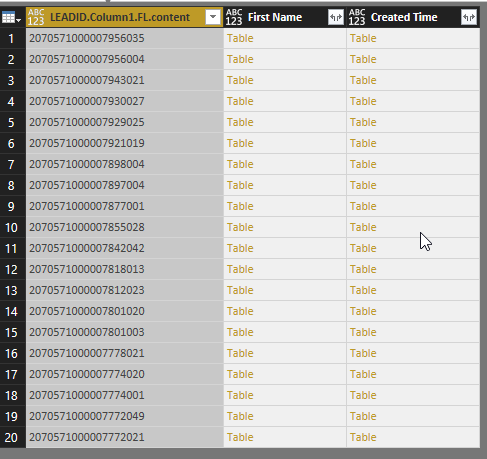
I have connected a JSON web api to power BI, and i have 20 records that i imported. each record contains (columns) of First name, lead id, created time. each row has a table.


If i expand the first column, i get 20 rows. perfect. 


if i expand any other column i get 400 rows. why is this happening? its multiplication to the number of rows. please help how can i fix this? 


PBIDesktop_2017-11-27_19-50-25.png

1 ACCEPTED SOLUTION
MarcelBeug
Community Champion
Community Champion

It's quite logical that each expansion of a column with nested tables will create additional rows, so the other columns will be duplicated the same number of times; also the other columns with nested tables.


There is a way to combine the nested tables, as illustrated in the query below.


However, I wonder how your query looks like so far.

It looks rather strange to me that you arrived in the situation with the nested tables.


Maybe you can share your query with some fake data?


Query CombinedTables:


let
    Source = 
        #table(
            type table[LeadId = Value.Type(Table1), First Name = Value.Type(Table2), Created Time = Value.Type(Table3)],
            {{Table1,Table2,Table3}}),

    #"Added Custom" =
        Table.AddColumn(
            Source, 
            "CombinedTables", 
            each Table.FromColumns(
                Table.ToColumns(
                    [LeadId])&
                Table.ToColumns(
                    [First Name])&
                Table.ToColumns([Created Time]), 
                Value.Type([LeadId]&[First Name]&[Created Time])), 
            Value.Type(Source[LeadId]{0}&Source[First Name]{0}&Source[Created Time]{0})),

    #"Removed Other Columns" = 
        Table.SelectColumns(
            #"Added Custom",
            {"CombinedTables"}),

    #"Expanded CombinedTables" = 
        Table.ExpandTableColumn(
            #"Removed Other Columns", 
            "CombinedTables",
            {"LeadID", "First Name", "Created Time"},
            {"LeadID", "First Name", "Created Time"})
in
    #"Expanded CombinedTables"


The 3 tables and my queries:
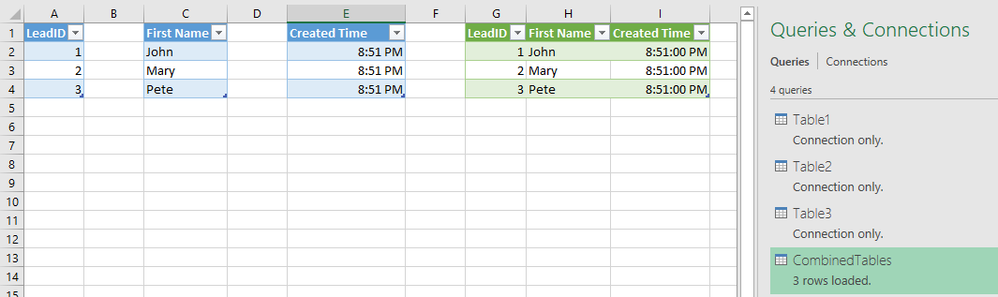
 

Combine tables.png

Specializing in Power Query Formula Language (M)

View solution in original post

2 REPLIES 2
v-ljerr-msft
Microsoft Employee
Microsoft Employee

Hi @eyaskelani,


Have you tried the solution provided by @MarcelBeug above? Does it work in your scenario? If it works, could you accept it as solution to close this thread?


If you still have any question on this issue, feel free to post here. Smiley Happy


Regards

MarcelBeug
Community Champion
Community Champion

It's quite logical that each expansion of a column with nested tables will create additional rows, so the other columns will be duplicated the same number of times; also the other columns with nested tables.


There is a way to combine the nested tables, as illustrated in the query below.


However, I wonder how your query looks like so far.

It looks rather strange to me that you arrived in the situation with the nested tables.


Maybe you can share your query with some fake data?


Query CombinedTables:


let
    Source = 
        #table(
            type table[LeadId = Value.Type(Table1), First Name = Value.Type(Table2), Created Time = Value.Type(Table3)],
            {{Table1,Table2,Table3}}),

    #"Added Custom" =
        Table.AddColumn(
            Source, 
            "CombinedTables", 
            each Table.FromColumns(
                Table.ToColumns(
                    [LeadId])&
                Table.ToColumns(
                    [First Name])&
                Table.ToColumns([Created Time]), 
                Value.Type([LeadId]&[First Name]&[Created Time])), 
            Value.Type(Source[LeadId]{0}&Source[First Name]{0}&Source[Created Time]{0})),

    #"Removed Other Columns" = 
        Table.SelectColumns(
            #"Added Custom",
            {"CombinedTables"}),

    #"Expanded CombinedTables" = 
        Table.ExpandTableColumn(
            #"Removed Other Columns", 
            "CombinedTables",
            {"LeadID", "First Name", "Created Time"},
            {"LeadID", "First Name", "Created Time"})
in
    #"Expanded CombinedTables"


The 3 tables and my queries:


Combine tables.png

Specializing in Power Query Formula Language (M)

Helpful resources

Announcements
April Power BI Update Carousel

Power BI Monthly Update - April 2026

Check out the April 2026 Power BI update to learn about new features.

New to Fabric survey Carousel

New to Fabric Survey

If you have recently started exploring Fabric, we'd love to hear how it's going. Your feedback can help with product improvements.

Power BI DataViz World Championships carousel

Power BI DataViz World Championships - June 2026

A new Power BI DataViz World Championship is coming this June! Don't miss out on submitting your entry.

FabCon and SQLCon Highlights Carousel

FabCon &SQLCon Highlights

Experience the highlights from FabCon & SQLCon, available live and on-demand starting April 14th.