Get certified for free when you join Fabric Data Days 2026 and dive into Fabric, Power BI, SQL, AI, and other essential data skills.
Join nowData Days is here! Join us now for 60+ days of learning, challenges, and connection. Learn more
Hi All,
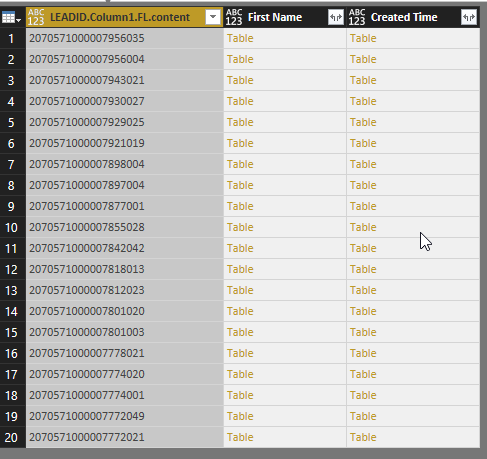
I have connected a JSON web api to power BI, and i have 20 records that i imported. each record contains (columns) of First name, lead id, created time. each row has a table.
If i expand the first column, i get 20 rows. perfect.
if i expand any other column i get 400 rows. why is this happening? its multiplication to the number of rows. please help how can i fix this?
Solved! Go to Solution.
It's quite logical that each expansion of a column with nested tables will create additional rows, so the other columns will be duplicated the same number of times; also the other columns with nested tables.
There is a way to combine the nested tables, as illustrated in the query below.
However, I wonder how your query looks like so far.
It looks rather strange to me that you arrived in the situation with the nested tables.
Maybe you can share your query with some fake data?
Query CombinedTables:
let
Source =
#table(
type table[LeadId = Value.Type(Table1), First Name = Value.Type(Table2), Created Time = Value.Type(Table3)],
{{Table1,Table2,Table3}}),
#"Added Custom" =
Table.AddColumn(
Source,
"CombinedTables",
each Table.FromColumns(
Table.ToColumns(
[LeadId])&
Table.ToColumns(
[First Name])&
Table.ToColumns([Created Time]),
Value.Type([LeadId]&[First Name]&[Created Time])),
Value.Type(Source[LeadId]{0}&Source[First Name]{0}&Source[Created Time]{0})),
#"Removed Other Columns" =
Table.SelectColumns(
#"Added Custom",
{"CombinedTables"}),
#"Expanded CombinedTables" =
Table.ExpandTableColumn(
#"Removed Other Columns",
"CombinedTables",
{"LeadID", "First Name", "Created Time"},
{"LeadID", "First Name", "Created Time"})
in
#"Expanded CombinedTables"
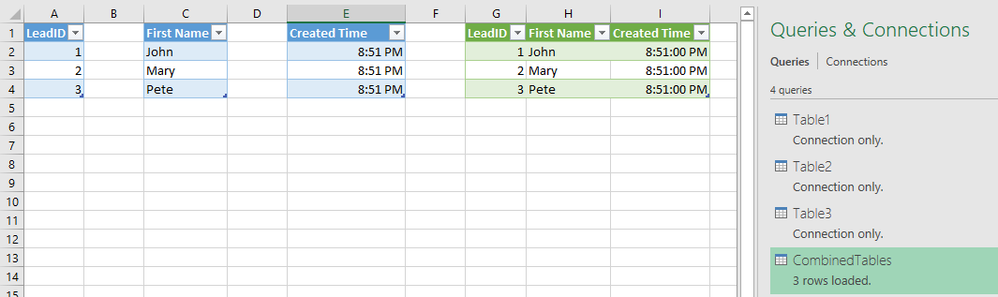
The 3 tables and my queries:
Hi @eyaskelani,
Have you tried the solution provided by @MarcelBeug above? Does it work in your scenario? If it works, could you accept it as solution to close this thread?
If you still have any question on this issue, feel free to post here. ![]()
Regards
It's quite logical that each expansion of a column with nested tables will create additional rows, so the other columns will be duplicated the same number of times; also the other columns with nested tables.
There is a way to combine the nested tables, as illustrated in the query below.
However, I wonder how your query looks like so far.
It looks rather strange to me that you arrived in the situation with the nested tables.
Maybe you can share your query with some fake data?
Query CombinedTables:
let
Source =
#table(
type table[LeadId = Value.Type(Table1), First Name = Value.Type(Table2), Created Time = Value.Type(Table3)],
{{Table1,Table2,Table3}}),
#"Added Custom" =
Table.AddColumn(
Source,
"CombinedTables",
each Table.FromColumns(
Table.ToColumns(
[LeadId])&
Table.ToColumns(
[First Name])&
Table.ToColumns([Created Time]),
Value.Type([LeadId]&[First Name]&[Created Time])),
Value.Type(Source[LeadId]{0}&Source[First Name]{0}&Source[Created Time]{0})),
#"Removed Other Columns" =
Table.SelectColumns(
#"Added Custom",
{"CombinedTables"}),
#"Expanded CombinedTables" =
Table.ExpandTableColumn(
#"Removed Other Columns",
"CombinedTables",
{"LeadID", "First Name", "Created Time"},
{"LeadID", "First Name", "Created Time"})
in
#"Expanded CombinedTables"
The 3 tables and my queries:
Don't miss out on Data Days, June 15 through August 7. Learn Fabric, Power BI, SQL, AI and more.
Check out the May 2026 Power BI update to learn about new features.
| User | Count |
|---|---|
| 23 | |
| 21 | |
| 20 | |
| 19 | |
| 13 |
| User | Count |
|---|---|
| 58 | |
| 50 | |
| 38 | |
| 31 | |
| 27 |