cancel
Showing results for 
Search instead for 
Did you mean: 

July 28 - August 9 | Final Round of the Power BI Dataviz World Championships. This is your chance. Learn more

Reply
sbacalso
Frequent Visitor

Nested IF - powerquery

Hi,

Good day.
Im just new in Power Query and I have a situation.
I have columns "Source", "Trans Type", "SW Request Type" and I want to create new column that will capture the values of Column "Source" if both Columns "Trans Type" and "SW Request Type" are BLANK. And also, it will capture the values of Columns Trans Type and SW Request if they're not empty.


Please see expected output below.  Man Happy

Source     |  Trans Type | SW Request Type | New Column
---------------------------------------------------------------------
GAPS        |                    |                              | GAPS
HW           |                    |                              | HW
SW           |                    | SW CASE               | SW CASE
SW           |                    | Sold to CASE         | Sold to CASE
SW Rqst   | Channel      |                               | Channel    
SW Rqst   | Oppty         |                               | Oppty

Thanks you

2 ACCEPTED SOLUTIONS
petrovnikitamai
Resolver V
Resolver V

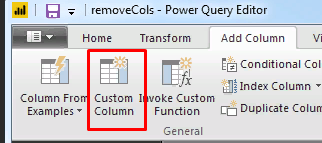
try to add custom column and use 

= if [Trans Type]<>null then [Trans Type] else if [SW Request Type]<>null then [SW Request Type] else [Source]

image.png

View solution in original post

PattemManohar
Community Champion
Community Champion

@sbacalso Just an another way of doing without multiple IF statements.


Add a custom column as below in "Power Query Editor"


=List.Last(List.Select({[Source], [TransType], [SWRequestType]}, each Text.Length(_) <> 0 ))

image.png 


Did I answer your question? Mark my post as a solution!

Proud to be a PBI Community Champion


View solution in original post

4 REPLIES 4
PattemManohar
Community Champion
Community Champion

@sbacalso Just an another way of doing without multiple IF statements.


Add a custom column as below in "Power Query Editor"


=List.Last(List.Select({[Source], [TransType], [SWRequestType]}, each Text.Length(_) <> 0 ))

image.png 


Did I answer your question? Mark my post as a solution!

Proud to be a PBI Community Champion


themistoklis
Community Champion
Community Champion

if [Trans Type] = null and [SW Request] = null then [Source]else if [Trans Type] <> null then [Trans Type] 
else if [SW Request] <> null then [SW Request]
else "No Value"

@sbacalso

You can insert the above formula in a new column

petrovnikitamai
Resolver V
Resolver V

try to add custom column and use 

= if [Trans Type]<>null then [Trans Type] else if [SW Request Type]<>null then [SW Request Type] else [Source]

image.png

Thank you @petrovnikitamai it works. 

Helpful resources

Announcements
Fabric Community Sticker Design Challenge Barcelona Carousel

Fabric Community Sticker Challenge - Barcelona 2026

If you love stickers, then you will definitely want to check out our community sticker challenge, Barcelona edition!

July Power BI Update Carousel

Power BI Monthly Update - July 2026

Check out the July 2026 Power BI update to learn about new features.

Power BI DataViz World Championships carousel

Power BI DataViz World Championships - June 2026

A new Power BI DataViz World Championship is coming this June! Don't miss out on submitting your entry.

Top Solution Authors
Top Kudoed Authors