cancel
Showing results for 
Search instead for 
Did you mean: 

July 7 - July 17 | Round 2 of the Power BI Dataviz World Championships. Don't miss your chance! Learn more

Reply
KevBI
Helper I
Helper I

Need help with Measure

Hello PowerBI Professionals!

I have 2 Measures that seem to work individually, but combined they somehow don't show the values they should.

First Measure is: 


_AmountInEUR =
VAR __BASELINE_VALUE = CALCULATE(SUMX('EKBE', EKBE[Amt.in loc.cur.])*2, 'EKBE'[Debit/Credit ind] IN { "H" })
VAR __MEASURE_VALUE = SUMX('EKBE', EKBE[Amt.in loc.cur.])
RETURN
    IF(NOT ISBLANK(__MEASURE_VALUE), (__MEASURE_VALUE - __BASELINE_VALUE) / [_ExchangeRate])
 
So when I delete the Part where the value gets divides by the Exchange Rate, it provides the correct values.
as soon as the second Measure [_ExchangeRate] is added, I get weird results...

Is the Syntax wrong to divide something that gets returned?
 
Second Measure: 
_ExchangeRate =
VAR
    _currency = max(EKBE[Currency])
VAR
    _conversionRate =
    CALCULATE(
            MAX( 'exch  rate AOP 2022'[Exchange Rate new Format])
            , 'exch  rate AOP 2022'[Currency] = _currency
    )
RETURN
_conversionRate
4 REPLIES 4
KevBI
Helper I
Helper I

Trying to add the Data like that because I can't upload the Report.

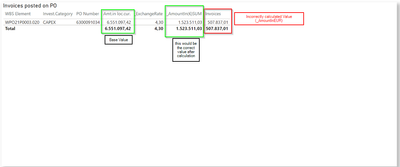
WBS ElementInv. CategoryPO NumberAmount in local CurrencyExchange RateAmount in €Invoices
WPO21P0003.020CAPEX63000910346551097.424.31523511,03507837,01


Amount in Local Currency = This is the Base Value that should get calculated to €
Exchange Rate = This is the Exchange Rate that always gives the correct Rate, 4.3 in this example
(as this is the correct value that gets put out, the problem has to be in this Measure: 

Invoice =

VAR __BASELINE_VALUE = CALCULATE(SUMX('EKBE', EKBE[Amt.in loc.cur.])*2, 'EKBE'[Debit/Credit ind] IN { "H" })
VAR __MEASURE_VALUE = SUMX('EKBE', EKBE[Amt.in loc.cur.])
RETURN
    IF(NOT ISBLANK(__MEASURE_VALUE), (__MEASURE_VALUE - __BASELINE_VALUE) / [_ExchangeRate])

If I try to leave the  divide by [_ExchangeRate]) out, I get the correct value out of the previous Measure.
The only thing that is not working is the calculation with Exchange Rate (so divided by 4.3 in this case).

If I try to divide in another Measure with [_ExchangeRate]), it also calculates correctly, like in this case ->

_AmountIn(€)SUM = SUMX(EKBE[Amount in Local Currency]) EKBE[_ExchangeRate]

I hope this is enough data.
lbendlin
Super User
Super User

Please provide sanitized sample data that fully covers your issue. I can only help you with meaningful sample data.
Please paste the data into a table in your post or use one of the file services like OneDrive or Google Drive. Screenshots of your source data are not useful.
Please show the expected outcome based on the sample data you provided. Screenshots of the expected outcome are ok.

https://community.powerbi.com/t5/Community-Blog/How-to-provide-sample-data-in-the-Power-BI-Forum/ba-...
https://community.powerbi.com/t5/Desktop/How-to-Get-Your-Question-Answered-Quickly/m-p/1447523

Okey sorry for the bad data.

KevBI_1-1660736559650.png

_AmountIn(€)SUM = SUMX(EKBE, [Amt.in loc.cur.]) / EKBE[_ExchangeRate]

-This is what I did for the correct calculation but I still need the logic in the calculation that i left out on this one.

Do you need any more data from me?

Please provide sanitized sample data that fully covers your issue. I can only help you with meaningful sample data.
Please paste the data into a table in your post or use one of the file services like OneDrive or Google Drive. Screenshots of your source data are not useful.
Please show the expected outcome based on the sample data you provided

Helpful resources

Announcements
FabCon and SQLCon Barcelona 2026

FabCon & SQLCon – Barcelona 2026

Join us in Barcelona for FabCon and SQLCon, the Fabric, Power BI, SQL, and AI community event. Save €200 with code FABCMTY200.

60 days of Data Days Carousel

Data Days 2026

Join Fabric Data Days 2026: 60 days of free live/on-demand sessions, challenges, study groups, and certification opportunities.

Power BI DataViz World Championships carousel

Power BI DataViz World Championships - June 2026

A new Power BI DataViz World Championship is coming this June! Don't miss out on submitting your entry.

Top Solution Authors