Hi, everyone.
I am working on data from Dynamics 365. The example below is a simplification. I have a Users table with their Manager (ReportsTo). I then have a Sales table. When a user logs into Power BI, I capture who they are and this passes through to a filter (represented as the slicer). I do NOT have a relationship between Sales and Users, since I am actually trying to capture information for all the people who report (either directly or indirectly) into a Manager. So for Sue, I should see sales for herself, for Lucy, and for Ziad. Whereas for Alice, I should see sales for all the users. If Bob logged in, he should only see himself.
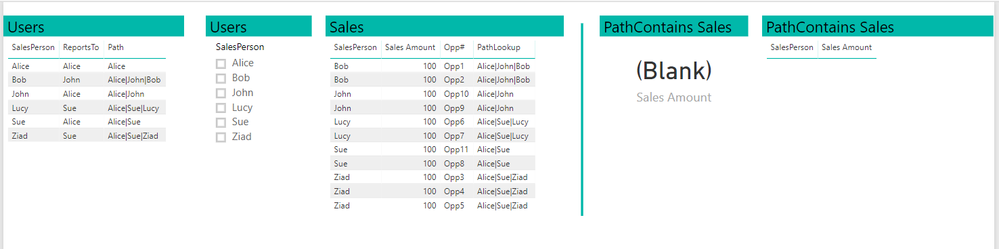
I am thinking the Path functionality is the best way to capture this. The steps I follow are
- Create a Path column in Users.
- Create a PathLookup column in Sales.
- Create a calculated table using the following code:
PathContains Sales =

FILTER (

    Sales,

    PATHCONTAINS ( Sales[PathLookup], SELECTEDVALUE ( Users[SalesPerson] ) )

)
However, this does not return any values. I am attaching the sample workbook. I feel like I am missing something obvious, so any and all help is most appreciated!
Best, Scott


