Hello PBI Community.
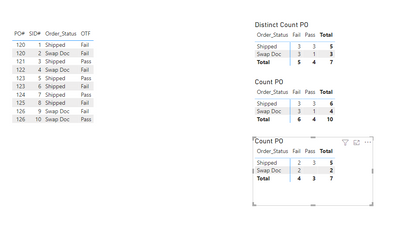
I am having difficulty creating a DAX measure that combines s the following distinct and non-distinct attributes within the same Matrix:
- Counts the distinct Purchase Orders ([PO#]) within my table ('020_BOS') presented as following:
- Row Subtotals = Order Status ([Order_Status])
- Shipped
- Deleted
- Swap Doc
- Column Subtotals = On Time Fulfillment ([OTF])
- Pass
- Fail
- For the non-distinct Purchase Orders ([PO#]) within my table ('020_BOS'), only counts/includes the attributes of the first Shipment ID# ([SID#]) assigned sequentially to the PO#.


In my table ('020_BOS') :
- There are a total of 10,668 Purchase Orders.
- 10,660 of the PO#'s are distinct (with a single SID#) whereas 8 are non-distinct (with two SID#'s).
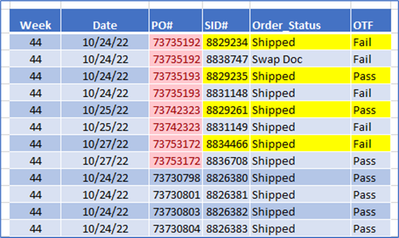
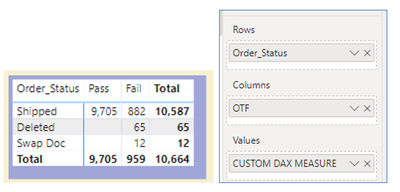
I need both my matrix's subtotal and total counts to equal 10,664 – which reflects the attributes of the 10,660 distinct PO's combined with the attributes of the first [SID#] for the 4, non-distinct PO's.
My DESIRED MATRIX is as follows with both subtotals and totals reflecting 10,664 Purchase Orders:
The Original Matrix (using the implicit "Count" option for PO#) is as follows:
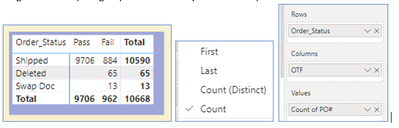
The Original Matrix (using implicit "Count (Distinct)" option for PO#) is as follows:
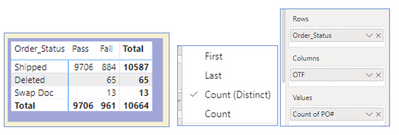
NOTES:
- The "Desired Matrix" above was created using an inefficient, non-DAX approach where I duplicated tables, identified "unique" PO#'s, then merged results back to my original table. Unfortunately, my data set is much too large for this approach.
- If I had a Dollar ($) for every incorrect version of SUMX, HASONEVALUE, & VAR formula I have attempted thus far... I would be a wealthy individual! 🙂
Examples:
- OTF_DC1 = SUMX(SUMMARIZE('020_BOS','020_BOS'[OTF],'020_BOS'[Order_Status],"_1",CALCULATE(DISTINCTCOUNT('020_BOS'[PO#]))),[_1])
- OTF_DC2 = IF(HASONEVALUE('020_BOS'[OTF]),COUNT('020_BOS'[PO#]),BLANK())

Thanks in advance for any assistance, advice, or insights you could offer.