cancel
Showing results for 
Search instead for 
Did you mean: 

The Power BI Data Visualization World Championships is back! Get ahead of the game and start preparing now! Learn more

Reply
Raj2410
Helper I
Helper I

Need Support with Customizing Table visual.

Hi Need some help.

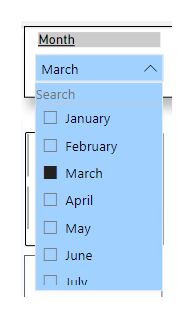
These are my Slicers and I have made sure that my slicer don't interface or intract with my visual.

Raj2410_0-1679680453954.png

This is my visual -1 created for the year 2023.

Raj2410_1-1679680495639.png

The data for April to Dec exist in my table but as we are in Month of MArch  I want to present only data from Jan -March.

I do want to keep the April to Dec headers but I want them to stay blank. Then in April I want the data for April to start showing.

Also at the end of table in YTD I want the table to calculate only Jan Feb and March only for now and when we get to April.

I want the YTD to change to calculating Jan to April.


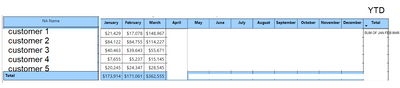
This below visual is something I want to achieve.

Please suggest.


Raj2410_2-1679680819705.png


3 ACCEPTED SOLUTIONS
Raj2410
Helper I
Helper I

I THHINK THIS IS WHAT I WANT TO DO - HIDE VALUES UNDERS SPECIFIC COLOUMNS IN MATRIX TABLE VISUAL BUT KEEP COLOUMN HEADER.

Raj2410_0-1679683525826.png


View solution in original post

Anand24
Super User
Super User

Hi @Raj2410 ,
For hiding data from April to December, you can use conditional formatting on font-color such that if month > month(today()), then font-color = white. This will enable overlay of white font with white background and hence the data would be present in the table but it will not be visible to the users.

As for the 2nd query of showing only data till March only for totals, that is something that might not be possible in Power BI at present on a default. 
As a work-around, you can create a month named "Total" and show it on the table. Make sure from backend itself that this "Total" has sum of Jan to March in it.

PBI_SuperUser_Rank@1x.png  

Give a Thumbs Up if this post helped you in any way and Mark This Post as Solution if it solved your query !!!

Proud To Be a Super User !!!
LinkedIn

View solution in original post

@Raj2410 I think something like putting an IF at the end of your measure like IF(MAX('Date'[Date]) > TODAY(), BLANK(), [Measure])


Follow on LinkedIn
@ me in replies or I'll lose your thread!!!
Instead of a Kudo, please vote for this idea
Become an expert!: Enterprise DNA
External Tools: MSHGQM
YouTube Channel!: Microsoft Hates Greg
Latest book!:
DAX For Humans

DAX is easy, CALCULATE makes DAX hard...

View solution in original post

4 REPLIES 4
Anand24
Super User
Super User

Hi @Raj2410 ,
For hiding data from April to December, you can use conditional formatting on font-color such that if month > month(today()), then font-color = white. This will enable overlay of white font with white background and hence the data would be present in the table but it will not be visible to the users.

As for the 2nd query of showing only data till March only for totals, that is something that might not be possible in Power BI at present on a default. 
As a work-around, you can create a month named "Total" and show it on the table. Make sure from backend itself that this "Total" has sum of Jan to March in it.

PBI_SuperUser_Rank@1x.png  

Give a Thumbs Up if this post helped you in any way and Mark This Post as Solution if it solved your query !!!

Proud To Be a Super User !!!
LinkedIn

Raj2410
Helper I
Helper I

@amitchandak  @Greg_Deckler  Can you suggest.

@Raj2410 I think something like putting an IF at the end of your measure like IF(MAX('Date'[Date]) > TODAY(), BLANK(), [Measure])


Follow on LinkedIn
@ me in replies or I'll lose your thread!!!
Instead of a Kudo, please vote for this idea
Become an expert!: Enterprise DNA
External Tools: MSHGQM
YouTube Channel!: Microsoft Hates Greg
Latest book!:
DAX For Humans

DAX is easy, CALCULATE makes DAX hard...
Raj2410
Helper I
Helper I

I THHINK THIS IS WHAT I WANT TO DO - HIDE VALUES UNDERS SPECIFIC COLOUMNS IN MATRIX TABLE VISUAL BUT KEEP COLOUMN HEADER.

Raj2410_0-1679683525826.png


Helpful resources

Announcements
Power BI DataViz World Championships

Power BI Dataviz World Championships

The Power BI Data Visualization World Championships is back! Get ahead of the game and start preparing now!

December 2025 Power BI Update Carousel

Power BI Monthly Update - December 2025

Check out the December 2025 Power BI Holiday Recap!

FabCon Atlanta 2026 carousel

FabCon Atlanta 2026

Join us at FabCon Atlanta, March 16-20, for the ultimate Fabric, Power BI, AI and SQL community-led event. Save $200 with code FABCOMM.