This is best Fabric, Power BI, SQL and AI community event. How do we know? The last event sold out! Save €200 with code FABCMTY200.
Register nowA new Data Days event is coming soon! This time we’re going bigger than ever. Fabric, Power BI, SQL, AI and more. Don't miss out.
Hi,
I have such DB for which I need to see Tbl in Power BI, where he will keep me only 1 entry per project taking into account this control:
Check for each project is Start date is the same, should check the end date and keep for me the latest date and delete other rows for that project
if the start date is not the same, he will keep for me the latest date and delete other rows related to that project.
I appreciate if you could send me the PBI report so it will be easy for me to understand.
| Project | Start Date | End date |
| A | 21/12/2021 | 18/01/2022 |
| B | 16/10/2022 | 17/10/2022 |
| C | 23/02/2022 | 22/04/2022 |
| C | 23/02/2022 | 05/06/2022 |
| C | 23/02/2022 | 25/08/2022 |
| D | 21/12/2019 | 06/07/2022 |
| K | 09/03/2020 | 02/02/2022 |
| F | 22/06/2021 | 03/07/2022 |
| Z | 15/11/2021 | 19/01/2022 |
| Z | 15/04/2022 | 20/06/2022 |
| W | 08/06/2021 | 02/02/2022 |
| J | 08/04/2020 | 18/03/2022 |
| X | 12/04/2022 | 20/04/2022 |
| X | 29/06/2022 | 29/06/2022 |
Solved! Go to Solution.
Hi,
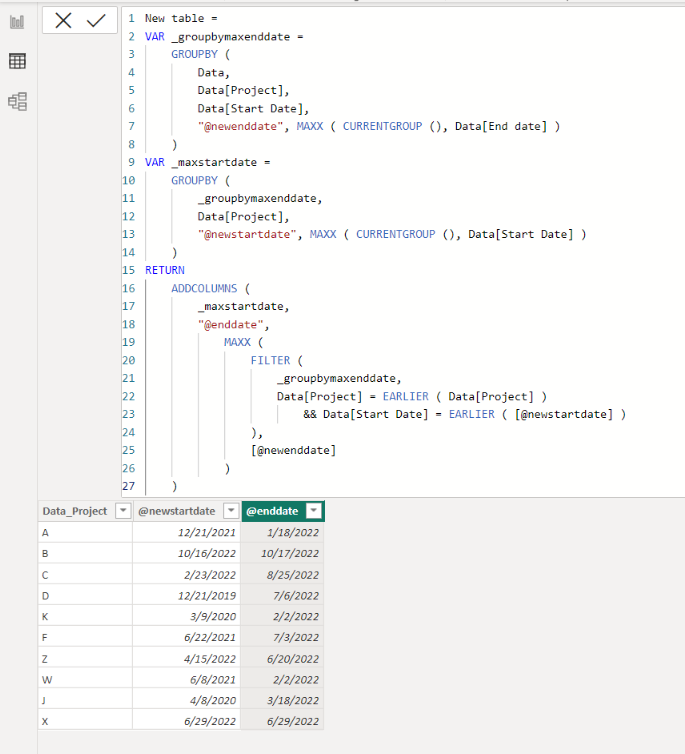
I am not sure if I understood your question correctly, but please check the below picture and the attached pbix file.
It is for creating a new table.
New table =
VAR _groupbymaxenddate =
GROUPBY (
Data,
Data[Project],
Data[Start Date],
"@newenddate", MAXX ( CURRENTGROUP (), Data[End date] )
)
VAR _maxstartdate =
GROUPBY (
_groupbymaxenddate,
Data[Project],
"@newstartdate", MAXX ( CURRENTGROUP (), Data[Start Date] )
)
RETURN
ADDCOLUMNS (
_maxstartdate,
"@enddate",
MAXX (
FILTER (
_groupbymaxenddate,
Data[Project] = EARLIER ( Data[Project] )
&& Data[Start Date] = EARLIER ( [@newstartdate] )
),
[@newenddate]
)
)
Yes that's the output i want.
Thanks
Hi,
I am not sure if I understood your question correctly, but please check the below picture and the attached pbix file.
It is for creating a new table.
New table =
VAR _groupbymaxenddate =
GROUPBY (
Data,
Data[Project],
Data[Start Date],
"@newenddate", MAXX ( CURRENTGROUP (), Data[End date] )
)
VAR _maxstartdate =
GROUPBY (
_groupbymaxenddate,
Data[Project],
"@newstartdate", MAXX ( CURRENTGROUP (), Data[Start Date] )
)
RETURN
ADDCOLUMNS (
_maxstartdate,
"@enddate",
MAXX (
FILTER (
_groupbymaxenddate,
Data[Project] = EARLIER ( Data[Project] )
&& Data[Start Date] = EARLIER ( [@newstartdate] )
),
[@newenddate]
)
)
Hi,
Clearly show the expected result.
Check out the May 2026 Power BI update to learn about new features.
Sign up to receive a private message when registration opens and key events begin.
If you have recently started exploring Fabric, we'd love to hear how it's going. Your feedback can help with product improvements.
| User | Count |
|---|---|
| 27 | |
| 25 | |
| 25 | |
| 21 | |
| 14 |
| User | Count |
|---|---|
| 50 | |
| 44 | |
| 20 | |
| 18 | |
| 18 |