Don't miss your chance to take the Fabric Data Engineer (DP-600) exam for FREE! Find out how by watching the DP-600 session on-demand now through April 28th.
Learn moreJoin the FabCon + SQLCon recap series. Up next: Power BI, Real-Time Intelligence, IQ and AI, and Data Factory take center stage. All sessions are available on-demand after the live show. Register now
Hi,
I have such DB for which I need to see Tbl in Power BI, where he will keep me only 1 entry per project taking into account this control:
Check for each project is Start date is the same, should check the end date and keep for me the latest date and delete other rows for that project
if the start date is not the same, he will keep for me the latest date and delete other rows related to that project.
I appreciate if you could send me the PBI report so it will be easy for me to understand.
| Project | Start Date | End date |
| A | 21/12/2021 | 18/01/2022 |
| B | 16/10/2022 | 17/10/2022 |
| C | 23/02/2022 | 22/04/2022 |
| C | 23/02/2022 | 05/06/2022 |
| C | 23/02/2022 | 25/08/2022 |
| D | 21/12/2019 | 06/07/2022 |
| K | 09/03/2020 | 02/02/2022 |
| F | 22/06/2021 | 03/07/2022 |
| Z | 15/11/2021 | 19/01/2022 |
| Z | 15/04/2022 | 20/06/2022 |
| W | 08/06/2021 | 02/02/2022 |
| J | 08/04/2020 | 18/03/2022 |
| X | 12/04/2022 | 20/04/2022 |
| X | 29/06/2022 | 29/06/2022 |
Solved! Go to Solution.
Hi,
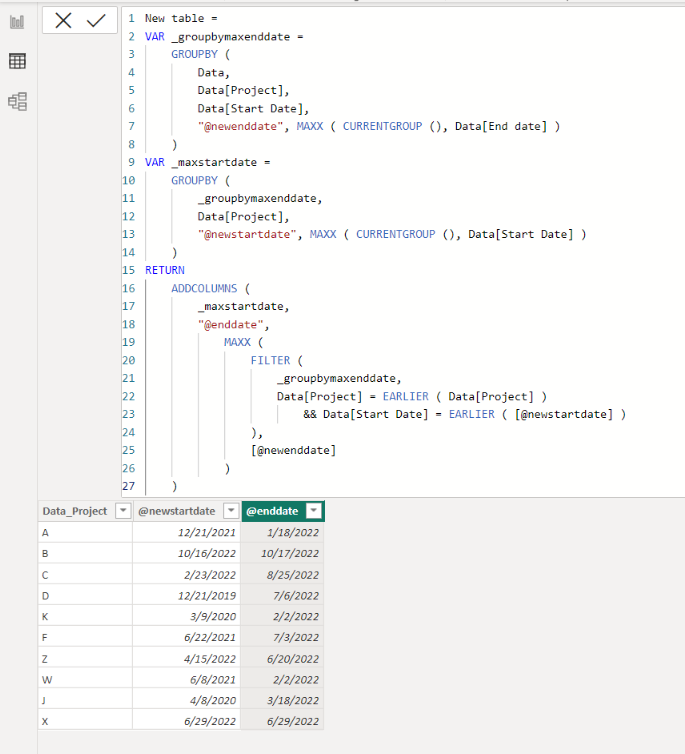
I am not sure if I understood your question correctly, but please check the below picture and the attached pbix file.
It is for creating a new table.
New table =
VAR _groupbymaxenddate =
GROUPBY (
Data,
Data[Project],
Data[Start Date],
"@newenddate", MAXX ( CURRENTGROUP (), Data[End date] )
)
VAR _maxstartdate =
GROUPBY (
_groupbymaxenddate,
Data[Project],
"@newstartdate", MAXX ( CURRENTGROUP (), Data[Start Date] )
)
RETURN
ADDCOLUMNS (
_maxstartdate,
"@enddate",
MAXX (
FILTER (
_groupbymaxenddate,
Data[Project] = EARLIER ( Data[Project] )
&& Data[Start Date] = EARLIER ( [@newstartdate] )
),
[@newenddate]
)
)
Yes that's the output i want.
Thanks
Hi,
I am not sure if I understood your question correctly, but please check the below picture and the attached pbix file.
It is for creating a new table.
New table =
VAR _groupbymaxenddate =
GROUPBY (
Data,
Data[Project],
Data[Start Date],
"@newenddate", MAXX ( CURRENTGROUP (), Data[End date] )
)
VAR _maxstartdate =
GROUPBY (
_groupbymaxenddate,
Data[Project],
"@newstartdate", MAXX ( CURRENTGROUP (), Data[Start Date] )
)
RETURN
ADDCOLUMNS (
_maxstartdate,
"@enddate",
MAXX (
FILTER (
_groupbymaxenddate,
Data[Project] = EARLIER ( Data[Project] )
&& Data[Start Date] = EARLIER ( [@newstartdate] )
),
[@newenddate]
)
)
Hi,
Clearly show the expected result.
Check out the April 2026 Power BI update to learn about new features.
If you have recently started exploring Fabric, we'd love to hear how it's going. Your feedback can help with product improvements.
A new Power BI DataViz World Championship is coming this June! Don't miss out on submitting your entry.
| User | Count |
|---|---|
| 42 | |
| 38 | |
| 33 | |
| 21 | |
| 15 |
| User | Count |
|---|---|
| 64 | |
| 59 | |
| 31 | |
| 27 | |
| 25 |