cancel
Showing results for 
Search instead for 
Did you mean: 

Next up in the FabCon + SQLCon recap series: The roadmap for Microsoft SQL and Maximizing Developer experiences in Fabric. All sessions are available on-demand after the live show. Register now

Reply
NeilL
Frequent Visitor

Need Help With DAX Filtering

Hello All,
I am new to DAX and am stuck.  I don't quite understand the FILTER() function which is, I think, the reason I am stuck.


I have two tables, Dates & Forecast, which are joined on a field labeled Date.  Dates table is a series of days from 1/1/2019 thru 12/31/2050.  Forecast table is a series of Project Titles, Dates, Revenues & Earnings, there are 75 projects with multiple rows containing dates and numbers, enough to fill up 23k rows.  For simplicity I'm only looking at the first project.


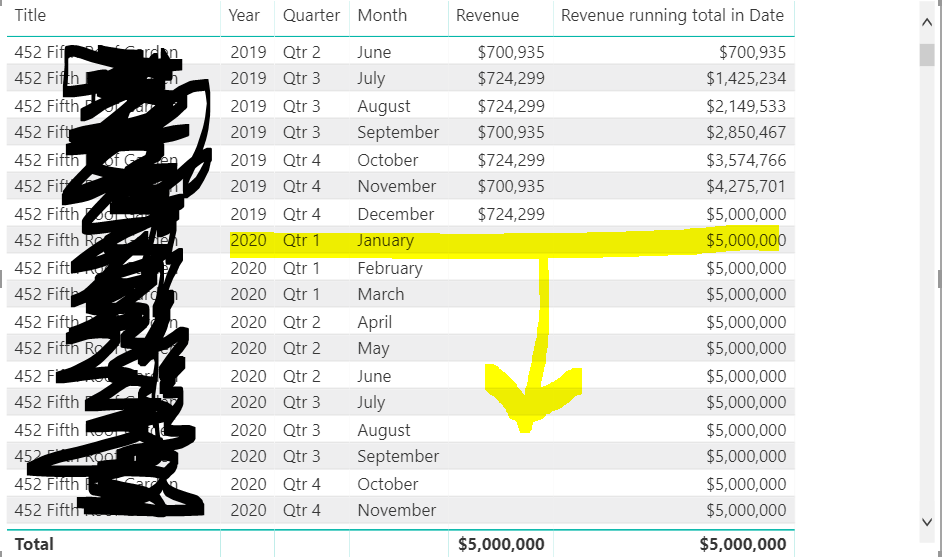
I finally was able to create a running total using quick measures and now have exactly what I want except that the running total continues running trough the end of the Dates table (12/31/2050) date when it should stop at 12/31/2019 (the last month for the project 452).


This first image shows the earliest date for my project 452 - begins with 6/1/2019.

Capture0.PNG


The next image shows the last date for the same project 452 - ends on 12/31/2019. The next row 

Capture1.PNG


In my report I see the running total doing exactly what I want/need it to do thru 12/2019, however, it doesn't stop. 


I would like for the running total to stop with the last month for that project then the next project appear in the list and see its Revenue and running total... rinse and repeat.
Capture2.PNG


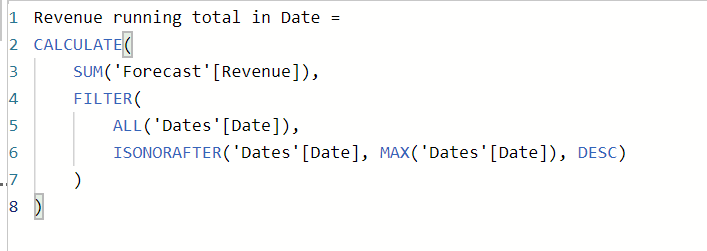
For reference, below is the formula for the running total, as produced by the quick measure:
 

Capture3.PNG

I really appreciate any and all help!


1 ACCEPTED SOLUTION
Anonymous
Not applicable

@NeilL -

You could modify the calculation like the following:


Running Total = 
var maxForecastDateInContext = MAX(Forecast[Date])
var lastDateInContext = MAX('Date'[Date])
var lastRelevantDate = MIN(lastDateInContext, maxSalesDate)
return CALCULATE(
    SUM('Forecast'[Revenue]),
    'Date'[Date] <= lastRelevantDate
)

Hope this Helps,

Nathan

View solution in original post

2 REPLIES 2
Anonymous
Not applicable

@NeilL -

You could modify the calculation like the following:


Running Total = 
var maxForecastDateInContext = MAX(Forecast[Date])
var lastDateInContext = MAX('Date'[Date])
var lastRelevantDate = MIN(lastDateInContext, maxSalesDate)
return CALCULATE(
    SUM('Forecast'[Revenue]),
    'Date'[Date] <= lastRelevantDate
)

Hope this Helps,

Nathan

@Anonymous That solved my problem!  Thank you for the speedy reply and helping me solve my issue!

Helpful resources

Announcements
New to Fabric survey Carousel

New to Fabric Survey

If you have recently started exploring Fabric, we'd love to hear how it's going. Your feedback can help with product improvements.

Power BI DataViz World Championships carousel

Power BI DataViz World Championships - June 2026

A new Power BI DataViz World Championship is coming this June! Don't miss out on submitting your entry.

Join our Fabric User Panel

Join our Fabric User Panel

Share feedback directly with Fabric product managers, participate in targeted research studies and influence the Fabric roadmap.

March Power BI Update Carousel

Power BI Community Update - March 2026

Check out the March 2026 Power BI update to learn about new features.