Get certified for free when you join Fabric Data Days 2026 and dive into Fabric, Power BI, SQL, AI, and other essential data skills.
Join nowTry your skills in the Power BI Dataviz World Championship! Round one ends June 26. Join now
Hi,
I have two tables, a student table and a family table.
The student table is as follows, where Student ID is the primary Key.
| Student ID | FamilyID |
| 1 | F001 |
| 2 | F002 |
| 3 | F003 |
| 4 | F004 |
| 5 | F001 |
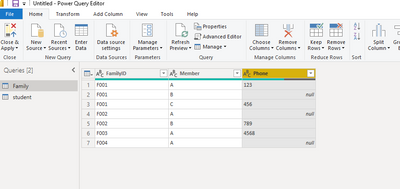
The Family table is as follows, where many family members may belong to the same family ID..
| FamilyID | Member | Phone |
| F001 | Dad | 016-456-89876 |
| F001 | Mom | |
| F001 | Uncle | 676-876-98543 |
| F002 | Dad | |
| F002 | Mom | 412-562-88765 |
| F003 | Dad | 416-542-86758 |
| F004 | Dad | 416-592-86988 |
I need to find the list of pupils for whom any of the family member's phone no is missing. I'm using a direct query which makes creating Calculated columns and using calculate function difficult.
I need a final output of something similar to
| Student ID | column |
| 1 | 1 |
| 2 | 1 |
| 3 | 0 |
| 4 | 0 |
| 5 | 1 |
Can anyone help me with this?
Thanks in advance.
Solved! Go to Solution.
First check the data type of Phone column in the query editor to ensure that the blank field is null.
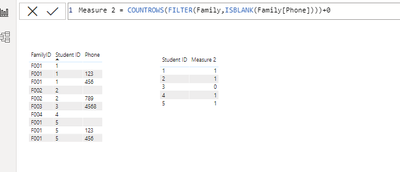
Then create a measure like below:
Measure 2 = COUNTROWS(FILTER(Family,ISBLANK(Family[Phone])))+0
First check the data type of Phone column in the query editor to ensure that the blank field is null.
Then create a measure like below:
Measure 2 = COUNTROWS(FILTER(Family,ISBLANK(Family[Phone])))+0
Hi @Anonymous
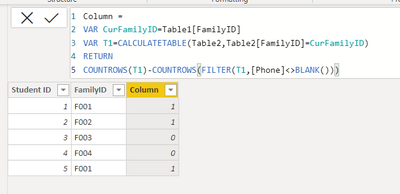
You need a calculated column in DAX, right? this table is called Table1, your other table is called Table2 in my sample
Column =
VAR CurFamilyID=Table1[FamilyID]
VAR T1=CALCULATETABLE(Table2,Table2[FamilyID]=CurFamilyID)
RETURN
COUNTROWS(T1)-COUNTROWS(FILTER(T1,[Phone]<>BLANK()))
Don't miss out on Data Days, June 15 through August 7. Learn Fabric, Power BI, SQL, AI and more.
Check out the May 2026 Power BI update to learn about new features.
| User | Count |
|---|---|
| 21 | |
| 21 | |
| 21 | |
| 19 | |
| 11 |
| User | Count |
|---|---|
| 59 | |
| 53 | |
| 40 | |
| 31 | |
| 26 |