Get certified for free when you join Fabric Data Days 2026 and dive into Fabric, Power BI, SQL, AI, and other essential data skills.
Join nowData Days is here! Join us now for 60+ days of learning, challenges, and connection. Learn more
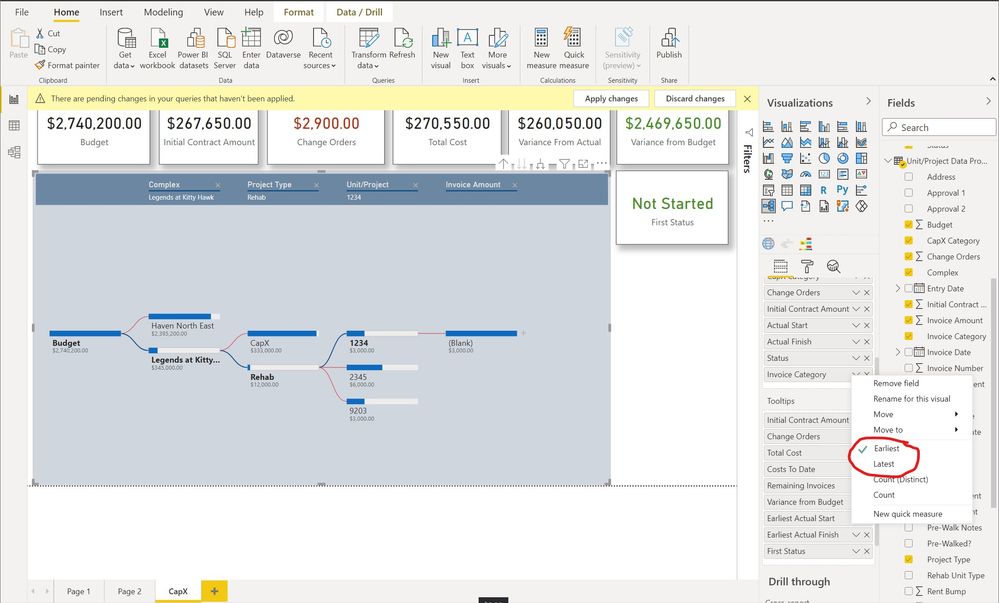
When I am trying to show data in a Decomposition Tree, it is only giving me the option to show "First or "Last". I just want it to show the actual value. How do I make that happen?
Solved! Go to Solution.
Hi @marotta44 ,
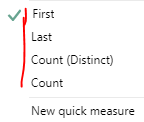
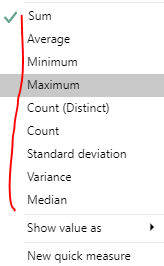
If you are putting the field Actual Start under the Tooltips option, you can only use it by selecting the aggregation function in conjunction with it. If the data type of field is Text or Date type, the corresponding aggregation function as Figure 1. If the data type of field is numeric, the corresponding aggregation function as Figure 2. Please refer to this official documentation for more details.
Date or Text field
Numeric field
Best Regards
Hi @marotta44
To get other options rather than First and Last you have to drag one filed or more in the zone Explained by
Did it work ? Mark it as a solution to help spreading knowledge.
A kudos would be appreciated
Hi Mark, I should have clarified. It works correctly Explained By section. But it will only give me first and last in the Tooltip section. Does that make sense? I apologize I didn't explain that properly initially. The same thing happens with some of my dates where it only shows earliest and latest.
Hi @marotta44
Those are the only available options when the field's format is TEXT
Did it work ? Mark it as a solution to help spreading knowledge.
A kudos would be appreciated
Its a date field. So are you saying in the tooltip, I cant show the actual like I can in the explain by?
Hi @marotta44 ,
If you are putting the field Actual Start under the Tooltips option, you can only use it by selecting the aggregation function in conjunction with it. If the data type of field is Text or Date type, the corresponding aggregation function as Figure 1. If the data type of field is numeric, the corresponding aggregation function as Figure 2. Please refer to this official documentation for more details.
Date or Text field
Numeric field
Best Regards
Don't miss out on Data Days, June 15 through August 7. Learn Fabric, Power BI, SQL, AI and more.
Check out the May 2026 Power BI update to learn about new features.
| User | Count |
|---|---|
| 23 | |
| 21 | |
| 20 | |
| 18 | |
| 13 |
| User | Count |
|---|---|
| 58 | |
| 50 | |
| 38 | |
| 31 | |
| 27 |