cancel
Showing results for 
Search instead for 
Did you mean: 

The Power BI Data Visualization World Championships is back! Get ahead of the game and start preparing now! Learn more

Reply
Anonymous
Not applicable

Need Help - Referencing columns from a different table while using Direct Query.

Hi,


I have two tables, a student table and a family table. 


The student table is as follows, where Student ID is the primary Key.


Student IDFamilyID
1F001
2F002
3F003
4F004
5F001


The Family table is as follows, where many family members may belong to the same family ID..


FamilyIDMemberPhone
F001Dad016-456-89876
F001Mom 
F001Uncle676-876-98543
F002Dad 
F002Mom412-562-88765
F003Dad416-542-86758
F004Dad416-592-86988


I need to find the list of pupils for whom any of the family member's phone no is missing. I'm using a direct query which makes creating Calculated columns and using calculate function difficult. 


I need a final output of something similar to 


Student IDcolumn
11
21
30
40
51


Can anyone help me with this?


Thanks in advance.

1 ACCEPTED SOLUTION
V-lianl-msft
Community Support
Community Support

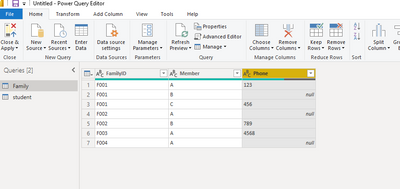
First check the data type of Phone column in the query editor to ensure that the blank field is null.

Vlianlmsft_0-1627888929720.png

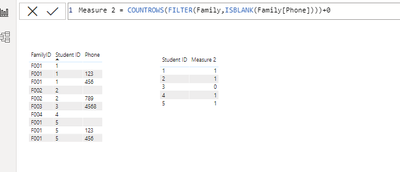
Then create a measure like below:

Measure 2 = COUNTROWS(FILTER(Family,ISBLANK(Family[Phone])))+0

Vlianlmsft_1-1627889067412.png


View solution in original post

2 REPLIES 2
V-lianl-msft
Community Support
Community Support

First check the data type of Phone column in the query editor to ensure that the blank field is null.

Vlianlmsft_0-1627888929720.png

Then create a measure like below:

Measure 2 = COUNTROWS(FILTER(Family,ISBLANK(Family[Phone])))+0

Vlianlmsft_1-1627889067412.png


Vera_33
Resident Rockstar
Resident Rockstar

Hi @Anonymous 


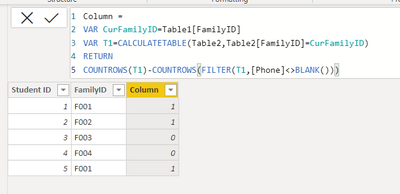
You need a calculated column in DAX, right? this table is called Table1, your other table is called Table2 in my sample

Vera_33_0-1627871406889.png

Column = 
VAR CurFamilyID=Table1[FamilyID]
VAR T1=CALCULATETABLE(Table2,Table2[FamilyID]=CurFamilyID)
RETURN
COUNTROWS(T1)-COUNTROWS(FILTER(T1,[Phone]<>BLANK()))


Helpful resources

Announcements
Power BI DataViz World Championships

Power BI Dataviz World Championships

The Power BI Data Visualization World Championships is back! Get ahead of the game and start preparing now!

December 2025 Power BI Update Carousel

Power BI Monthly Update - December 2025

Check out the December 2025 Power BI Holiday Recap!

FabCon Atlanta 2026 carousel

FabCon Atlanta 2026

Join us at FabCon Atlanta, March 16-20, for the ultimate Fabric, Power BI, AI and SQL community-led event. Save $200 with code FABCOMM.