Join us at FabCon Atlanta from March 16 - 20, 2026, for the ultimate Fabric, Power BI, AI and SQL community-led event. Save $200 with code FABCOMM.
Register now!The Power BI Data Visualization World Championships is back! It's time to submit your entry. Live now!
Dear all,
I'm totally novice using the DAX. I would like to calculate a MAT value from the today (ex. we are in P7) over the last 13 periods.
We will make P7 2021 - P72020
| Years | Periods | % Grade A |
| 2021 | P07 | 87,59 |
| 2021 | P06 | 86,78 |
| 2021 | P05 | 87,06 |
| 2021 | P04 | 87,37 |
| 2021 | P03 | 86,17 |
| 2021 | P02 | 86,82 |
| 2021 | P01 | 86,9 |
| 2020 | P13 | 86,64 |
| 2020 | P12 | 86,81 |
| 2020 | P11 | 85,87 |
| 2020 | P10 | 87,58 |
| 2020 | P09 | 87,21 |
| 2020 | P08 | 86,02 |
| 2020 | P07 | 86,44 |
In this case result is => % diff = 1,15 %
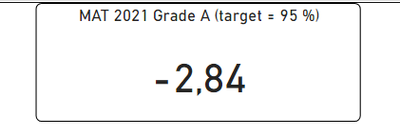
Should appear like this for the actual period (P7) (% is wring in this example):
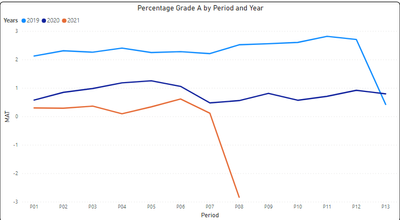
And I would like to make a graph with the calculation:
% Grade A is calculated like this:
Solved! Go to Solution.
Hi @Anonymous ,
Try the following formula:
Measure =
[% Grade A] - CALCULATE(
[% Grade A],
FILTER(
ALLSELECTED(rclms_qa[Years]),
rclms_qa[Years] = MAX(rclms_qa[Years]) - 1
)
)
If the problem is still not resolved, please provide detailed error information or the expected result you expect. Let me know immediately, looking forward to your reply.
Best Regards,
Winniz
If this post helps, then please consider Accept it as the solution to help the other members find it more quickly.
Hi @Anonymous ,
Try the following formula:
Measure =
[% Grade A] - CALCULATE(
[% Grade A],
FILTER(
ALLSELECTED(rclms_qa[Years]),
rclms_qa[Years] = MAX(rclms_qa[Years]) - 1
)
)
If the problem is still not resolved, please provide detailed error information or the expected result you expect. Let me know immediately, looking forward to your reply.
Best Regards,
Winniz
If this post helps, then please consider Accept it as the solution to help the other members find it more quickly.
The Power BI Data Visualization World Championships is back! It's time to submit your entry.
| User | Count |
|---|---|
| 50 | |
| 41 | |
| 32 | |
| 26 | |
| 24 |
| User | Count |
|---|---|
| 130 | |
| 128 | |
| 59 | |
| 45 | |
| 45 |