Get certified for free when you join Fabric Data Days 2026 and dive into Fabric, Power BI, SQL, AI, and other essential data skills.
Join nowData Days is here! Join us now for 60+ days of learning, challenges, and connection. Learn more
Dear all,
I'm totally novice using the DAX. I would like to calculate a MAT value from the today (ex. we are in P7) over the last 13 periods.
We will make P7 2021 - P72020
| Years | Periods | % Grade A |
| 2021 | P07 | 87,59 |
| 2021 | P06 | 86,78 |
| 2021 | P05 | 87,06 |
| 2021 | P04 | 87,37 |
| 2021 | P03 | 86,17 |
| 2021 | P02 | 86,82 |
| 2021 | P01 | 86,9 |
| 2020 | P13 | 86,64 |
| 2020 | P12 | 86,81 |
| 2020 | P11 | 85,87 |
| 2020 | P10 | 87,58 |
| 2020 | P09 | 87,21 |
| 2020 | P08 | 86,02 |
| 2020 | P07 | 86,44 |
In this case result is => % diff = 1,15 %
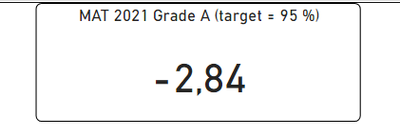
Should appear like this for the actual period (P7) (% is wring in this example):
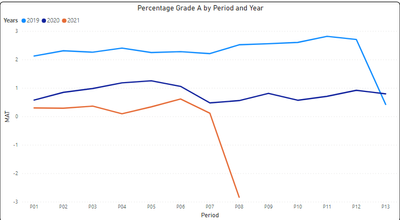
And I would like to make a graph with the calculation:
% Grade A is calculated like this:
Solved! Go to Solution.
Hi @Anonymous ,
Try the following formula:
Measure =
[% Grade A] - CALCULATE(
[% Grade A],
FILTER(
ALLSELECTED(rclms_qa[Years]),
rclms_qa[Years] = MAX(rclms_qa[Years]) - 1
)
)
If the problem is still not resolved, please provide detailed error information or the expected result you expect. Let me know immediately, looking forward to your reply.
Best Regards,
Winniz
If this post helps, then please consider Accept it as the solution to help the other members find it more quickly.
Hi @Anonymous ,
Try the following formula:
Measure =
[% Grade A] - CALCULATE(
[% Grade A],
FILTER(
ALLSELECTED(rclms_qa[Years]),
rclms_qa[Years] = MAX(rclms_qa[Years]) - 1
)
)
If the problem is still not resolved, please provide detailed error information or the expected result you expect. Let me know immediately, looking forward to your reply.
Best Regards,
Winniz
If this post helps, then please consider Accept it as the solution to help the other members find it more quickly.
Don't miss out on Data Days, June 15 through August 7. Learn Fabric, Power BI, SQL, AI and more.
Check out the May 2026 Power BI update to learn about new features.
| User | Count |
|---|---|
| 23 | |
| 23 | |
| 21 | |
| 17 | |
| 13 |
| User | Count |
|---|---|
| 58 | |
| 51 | |
| 40 | |
| 30 | |
| 24 |