This time we’re going bigger than ever. Fabric, Power BI, SQL, AI and more. We're covering it all. You won't want to miss it.
Learn moreLevel up your Power BI skills this month - build one visual each week and tell better stories with data! Get started
Hi I'm new in Power Bi. I just windering that the KPI Indicator Visualization can be set the range for KPI Color or not?
and how can it know that which value should be in which color?
Thank you very much.
Hi @iNuii,
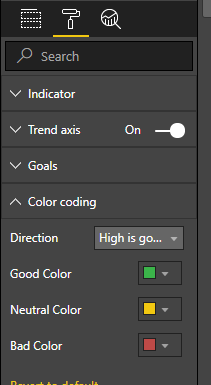
You can set the color for KPI indicator under format pane.
If "Indiator" value meets the "Target" value, it is formatted with "Good Color". Otherwise, it is formatted with "Bad" color.
Regards,
Yuliana Gu
@v-yulgu-msft Thank you for your reply,
but I wanna know that the KPI Customs Visualization (KPI Indicator) can be set the range / critiria for value or not?
Thank you in advance
Hi @iNuii,
but I wanna know that the KPI Customs Visualization (KPI Indicator) can be set the range / critiria for value or not?
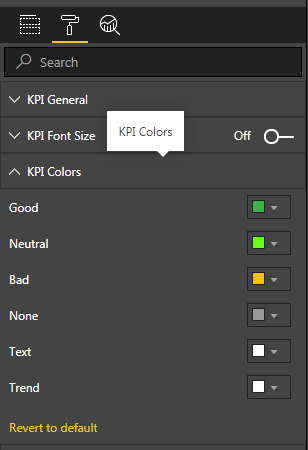
No. This is not supported now. The conditional colors in KPI Indicator works the same way as the built-in KPI visual.
Regards,
Yuliana Gu
Check out the April 2026 Power BI update to learn about new features.
Sign up to receive a private message when registration opens and key events begin.
If you have recently started exploring Fabric, we'd love to hear how it's going. Your feedback can help with product improvements.
| User | Count |
|---|---|
| 38 | |
| 28 | |
| 27 | |
| 22 | |
| 18 |
| User | Count |
|---|---|
| 67 | |
| 37 | |
| 32 | |
| 26 | |
| 25 |