Join us at FabCon Atlanta from March 16 - 20, 2026, for the ultimate Fabric, Power BI, AI and SQL community-led event. Save $200 with code FABCOMM.
Register now!Learn from the best! Meet the four finalists headed to the FINALS of the Power BI Dataviz World Championships! Register now
Hi I'm new in Power Bi. I just windering that the KPI Indicator Visualization can be set the range for KPI Color or not?
and how can it know that which value should be in which color?
Thank you very much.
Hi @iNuii,
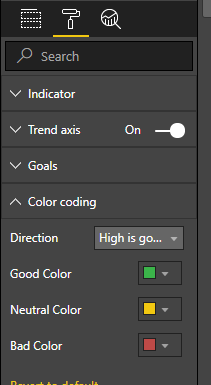
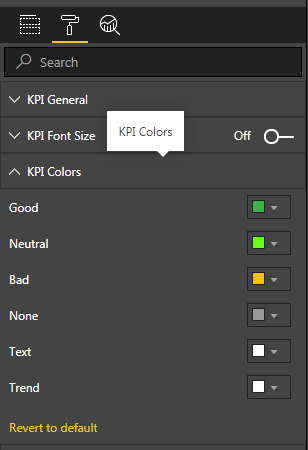
You can set the color for KPI indicator under format pane.
If "Indiator" value meets the "Target" value, it is formatted with "Good Color". Otherwise, it is formatted with "Bad" color.
Regards,
Yuliana Gu
@v-yulgu-msft Thank you for your reply,
but I wanna know that the KPI Customs Visualization (KPI Indicator) can be set the range / critiria for value or not?
Thank you in advance
Hi @iNuii,
but I wanna know that the KPI Customs Visualization (KPI Indicator) can be set the range / critiria for value or not?
No. This is not supported now. The conditional colors in KPI Indicator works the same way as the built-in KPI visual.
Regards,
Yuliana Gu
Share feedback directly with Fabric product managers, participate in targeted research studies and influence the Fabric roadmap.
Check out the February 2026 Power BI update to learn about new features.
| User | Count |
|---|---|
| 61 | |
| 59 | |
| 42 | |
| 18 | |
| 15 |
| User | Count |
|---|---|
| 109 | |
| 101 | |
| 39 | |
| 29 | |
| 29 |