cancel
Showing results for 
Search instead for 
Did you mean: 

Did you hear? There's a new SQL AI Developer certification (DP-800). Start preparing now and be one of the first to get certified. Register now

Reply
Anonymous
Not applicable

Nan and Infinity In Divide function

Hi,


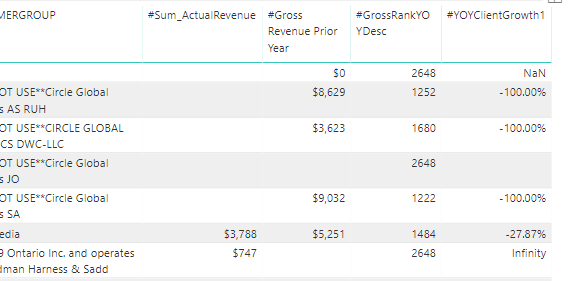
I have a growth calulated measure but the values are coming as nan and Infinity


below is the sample data 

The dax to calulate is 

#YOYClientGrowth1 = ([#Sum_ActualRevenue] - [#Gross Revenue Prior Year])/([#Gross Revenue Prior Year])
 
Now I need to put condition in the "#YOYClientGrowth1" for blank and 0 values
 
 Blank and Blank as 0
Current value and Previous Blank then 1
Current Blank and Previous value result -1


NanInfinityError.PNG


1 ACCEPTED SOLUTION
Anonymous
Not applicable

Hi @Anonymous 


You are getting NAN and Infinity because you are dividing 0 by 0 and 747 by blank ( where blanks it considers as zero)..


You will have to change your formula.


or you can try creating 2 quick measures. 

- 1st measure for subtraction SUM and Gross Revenue

- 2nd to divide the above measure with Gross Revenue.


Add in table to get somehting like this.


Capture 16.PNG

Let me know if this helps . 


Thanks,

Tejaswi


View solution in original post

4 REPLIES 4
Anonymous
Not applicable

use the DIVIDE function instead of  "/"

This should be the solution!

Anonymous
Not applicable

Hi @Anonymous 


You are getting NAN and Infinity because you are dividing 0 by 0 and 747 by blank ( where blanks it considers as zero)..


You will have to change your formula.


or you can try creating 2 quick measures. 

- 1st measure for subtraction SUM and Gross Revenue

- 2nd to divide the above measure with Gross Revenue.


Add in table to get somehting like this.


Capture 16.PNG

Let me know if this helps . 


Thanks,

Tejaswi


Anonymous
Not applicable

It worked with the Divide. Thanks

Helpful resources

Announcements
April Power BI Update Carousel

Power BI Monthly Update - April 2026

Check out the April 2026 Power BI update to learn about new features.

Fabric SQL PBI Data Days

Data Days 2026 coming soon!

Sign up to receive a private message when registration opens and key events begin.

New to Fabric survey Carousel

New to Fabric Survey

If you have recently started exploring Fabric, we'd love to hear how it's going. Your feedback can help with product improvements.

Power BI DataViz World Championships carousel

Power BI DataViz World Championships - June 2026

A new Power BI DataViz World Championship is coming this June! Don't miss out on submitting your entry.