cancel
Showing results for 
Search instead for 
Did you mean: 

July 7 - July 17 | Round 2 of the Power BI Dataviz World Championships. Don't miss your chance! Learn more

Reply
Anonymous
Not applicable

Nan and Infinity In Divide function

Hi,


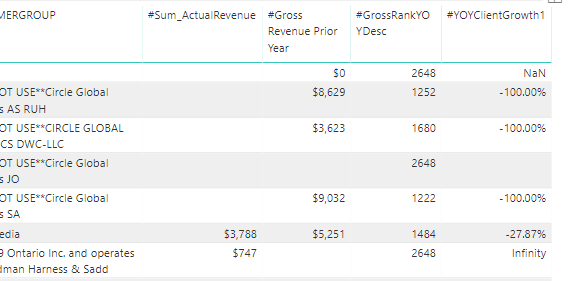
I have a growth calulated measure but the values are coming as nan and Infinity


below is the sample data 

The dax to calulate is 

#YOYClientGrowth1 = ([#Sum_ActualRevenue] - [#Gross Revenue Prior Year])/([#Gross Revenue Prior Year])
 
Now I need to put condition in the "#YOYClientGrowth1" for blank and 0 values
 
 Blank and Blank as 0
Current value and Previous Blank then 1
Current Blank and Previous value result -1


NanInfinityError.PNG


1 ACCEPTED SOLUTION
Anonymous
Not applicable

Hi @Anonymous 


You are getting NAN and Infinity because you are dividing 0 by 0 and 747 by blank ( where blanks it considers as zero)..


You will have to change your formula.


or you can try creating 2 quick measures. 

- 1st measure for subtraction SUM and Gross Revenue

- 2nd to divide the above measure with Gross Revenue.


Add in table to get somehting like this.


Capture 16.PNG

Let me know if this helps . 


Thanks,

Tejaswi


View solution in original post

4 REPLIES 4
Anonymous
Not applicable

use the DIVIDE function instead of  "/"

This should be the solution!

Anonymous
Not applicable

Hi @Anonymous 


You are getting NAN and Infinity because you are dividing 0 by 0 and 747 by blank ( where blanks it considers as zero)..


You will have to change your formula.


or you can try creating 2 quick measures. 

- 1st measure for subtraction SUM and Gross Revenue

- 2nd to divide the above measure with Gross Revenue.


Add in table to get somehting like this.


Capture 16.PNG

Let me know if this helps . 


Thanks,

Tejaswi


Anonymous
Not applicable

It worked with the Divide. Thanks

Helpful resources

Announcements
FabCon and SQLCon Barcelona 2026

FabCon & SQLCon – Barcelona 2026

Join us in Barcelona for FabCon and SQLCon, the Fabric, Power BI, SQL, and AI community event. Save €200 with code FABCMTY200.

Fabric Community Sticker Design Challenge Barcelona Carousel

Fabric Community Sticker Challenge - Barcelona 2026

If you love stickers, then you will definitely want to check out our community sticker challenge, Barcelona edition!

July Power BI Update Carousel

Power BI Monthly Update - July 2026

Check out the July 2026 Power BI update to learn about new features.

Power BI DataViz World Championships carousel

Power BI DataViz World Championships - June 2026

A new Power BI DataViz World Championship is coming this June! Don't miss out on submitting your entry.

Top Solution Authors