cancel
Showing results for 
Search instead for 
Did you mean: 

Learn from the best! Meet the four finalists headed to the FINALS of the Power BI Dataviz World Championships! Register now

Reply
Bokazoit
Continued Contributor

My total in my matrix is wrong? (Multiple questionare setup for Power BI)

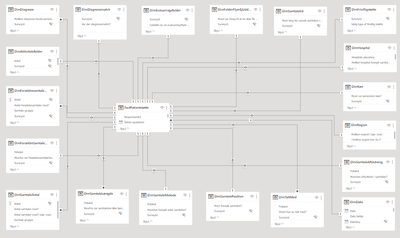
My datamodel is a typical multiple questionare model with bothways joins for all the dimensions with one Fact having each surveyId once and then the dimensions can have the several answers for every question (the model is described in here several threads):
Bokazoit_0-1695127701402.png


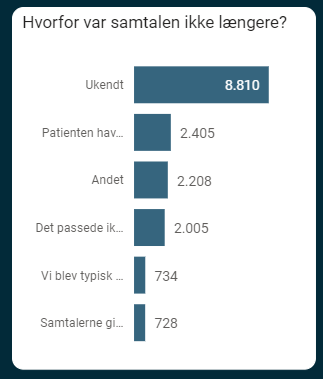
I was asked to show percentage of total, for this question:
 

Bokazoit_1-1695127773431.png

Where 'Ukendt' (=Unknown) is removed. That's when the trouble started 😞

I normally would use this measure to create a grand total:


Diagnose andel = DIVIDE (
           [Antal respondenter],
        
        CALCULATE ( [Antal respondenter],  ALLSELECTED(DimDiagnose[Hvilken diagnose havde personen?]))
)


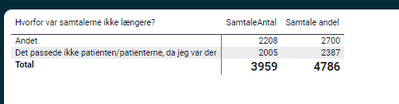
But the total is wrong:
 

Bokazoit_2-1695127911821.png

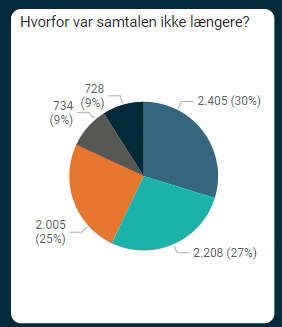
I removed other answers in the table, but the chart for the same answers show the same amount. But the total is wrong as can be seen. I can create this pie chart:
 

Bokazoit_3-1695128108098.png

And the percentage is correct, but I would prefer the stack chart and that I could calculate the total myself. What am I missing?

1 ACCEPTED SOLUTION
MFelix
Super User
Super User

Hi @Bokazoit ,


For this you need to create a measure that calculates the total value best option is that measure is a new one so you can easily debug and reuse it.


Try the following code:

Total Value = SUMX(Values(Table[Hvorfor var samtalerne ikke laenger?]),[Your Metric])

If you need this to be used in several metrics you must create a calculation item.


Regards

Miguel Félix


Did I answer your question? Mark my post as a solution!

Proud to be a Super User!

Check out my blog: Power BI em Português


View solution in original post

2 REPLIES 2
MFelix
Super User
Super User

Hi @Bokazoit ,


For this you need to create a measure that calculates the total value best option is that measure is a new one so you can easily debug and reuse it.


Try the following code:

Total Value = SUMX(Values(Table[Hvorfor var samtalerne ikke laenger?]),[Your Metric])

If you need this to be used in several metrics you must create a calculation item.


Regards

Miguel Félix


Did I answer your question? Mark my post as a solution!

Proud to be a Super User!

Check out my blog: Power BI em Português


Bokazoit
Continued Contributor

Tx that did the trick 🙂

Total Value = 
    DIVIDE([Antal samtaler], 
    CALCULATE( 
        SUMX(Values('DimSamtaleLængde'[Hvorfor var samtalerne ikke længere?]),[Antal samtaler]), 
        ALLSELECTED('DimSamtaleLængde'[Hvorfor var samtalerne ikke længere?])
    )
)

Helpful resources

Announcements
Join our Fabric User Panel

Join our Fabric User Panel

Share feedback directly with Fabric product managers, participate in targeted research studies and influence the Fabric roadmap.

February Power BI Update Carousel

Power BI Monthly Update - February 2026

Check out the February 2026 Power BI update to learn about new features.

FabCon Atlanta 2026 carousel

FabCon Atlanta 2026

Join us at FabCon Atlanta, March 16-20, for the ultimate Fabric, Power BI, AI and SQL community-led event. Save $200 with code FABCOMM.