
cancel
Showing results for 
Search instead for 
Did you mean: 

The Power BI Data Visualization World Championships is back! Get ahead of the game and start preparing now! Learn more

Reply
inescosta
Advocate II
Advocate II

Multiplying between Tables

imagem.pngimagem.pngimagem.pngimagem.pngimagem.pngimagem.pngimagem.png

Hello,


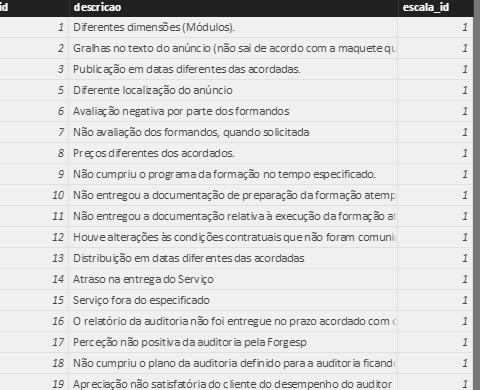
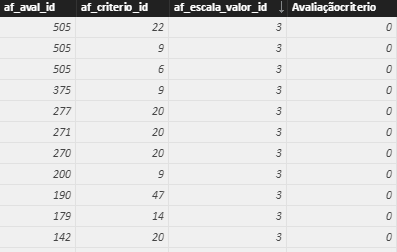
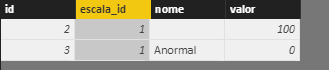
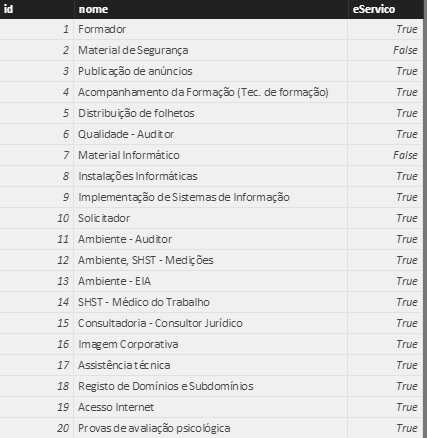
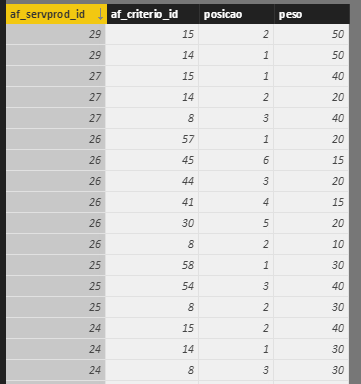
I am having problems with these tables. I need to calculate the (af_escalaItem[valor]*af_servprod_criterios[peso]) for each af_aval_id, but I just can't seem to do this.


Thank you in advance

1 ACCEPTED SOLUTION

Hi @v-ljerr-msft,


Thank you so much for the help but using the formula sumx returns the sum of all the values but that is not what I intended. I think this is my solution:


column=RELATED(af_escalaItem[valor]) *

CALCULATE(

    VALUES(af_servprod_criterios[peso]),

    FILTER(

        af_servprod_criterios,

        af_avaliacaoItens[af_criterio_id] = af_servprod_criterios[af_criterio_id] &&

        RELATED(af_fornecedorAvalia[af_servprod_id]) = af_servprod_criterios[af_servprod_id]

View solution in original post

4 REPLIES 4
Greg_Deckler
Community Champion
Community Champion

It looks like you might be missing some relationships between tables and you may need some "helper" tables.


So, for example, you would need a table with unique "escala_id" values I think and relate all of your tables with "escala_id" columns to this table. Then, you probably need a table with unique "af_servprod_id" values and relate all of your tables with with "af_servprod_id" columns to this table. Then you would need a table that relates "af_servprod_id"'s to "escala_id"'s. Then, you should be able to create a measure or a custom column in your table with unique "escala_id"'s to do the calculation.


Follow on LinkedIn
@ me in replies or I'll lose your thread!!!
Instead of a Kudo, please vote for this idea
Become an expert!: Enterprise DNA
External Tools: MSHGQM
YouTube Channel!: Microsoft Hates Greg
Latest book!:
DAX For Humans

DAX is easy, CALCULATE makes DAX hard...

imagem.png


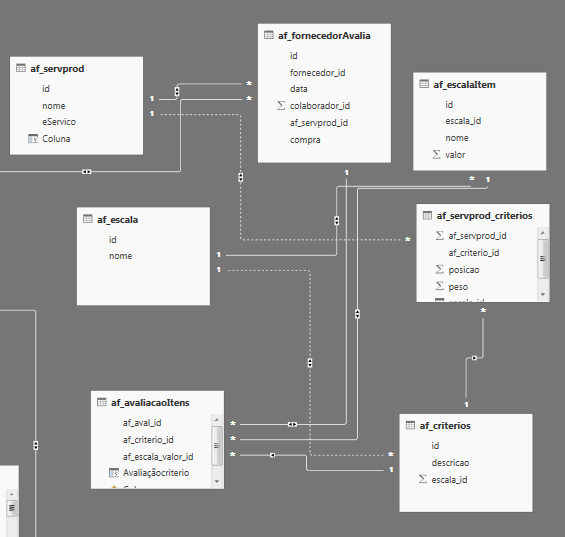
I thought I had those relationships, here is a print of the relationships I made. Do you think there is any missing?


Thank you

Hi @inescosta,


According to the screen shoot of your table relationships above, you should be able to use the formula below to create a new calculate column in "af_avaliacaoItens" table to to calculate the (af_escalaItem[valor]*af_servprod_criterios[peso]) for each af_aval_id.Smiley Happy

NewCalculateColumn = RELATED ( af_escalaItem[valor] ) * SUMX ( RELATEDTABLE ( af_servprod_criterios ), af_servprod_criterios[peso] )


Regards

Hi @v-ljerr-msft,


Thank you so much for the help but using the formula sumx returns the sum of all the values but that is not what I intended. I think this is my solution:


column=RELATED(af_escalaItem[valor]) *

CALCULATE(

    VALUES(af_servprod_criterios[peso]),

    FILTER(

        af_servprod_criterios,

        af_avaliacaoItens[af_criterio_id] = af_servprod_criterios[af_criterio_id] &&

        RELATED(af_fornecedorAvalia[af_servprod_id]) = af_servprod_criterios[af_servprod_id]

Helpful resources

Announcements
Power BI DataViz World Championships

Power BI Dataviz World Championships

The Power BI Data Visualization World Championships is back! Get ahead of the game and start preparing now!

December 2025 Power BI Update Carousel

Power BI Monthly Update - December 2025

Check out the December 2025 Power BI Holiday Recap!

FabCon Atlanta 2026 carousel

FabCon Atlanta 2026

Join us at FabCon Atlanta, March 16-20, for the ultimate Fabric, Power BI, AI and SQL community-led event. Save $200 with code FABCOMM.