
cancel
Showing results for 
Search instead for 
Did you mean: 

July 7 - July 17 | Round 2 of the Power BI Dataviz World Championships. Don't miss your chance! Learn more

Reply
inescosta
Advocate II
Advocate II

Multiplying between Tables

imagem.pngimagem.pngimagem.pngimagem.pngimagem.pngimagem.pngimagem.png

Hello,


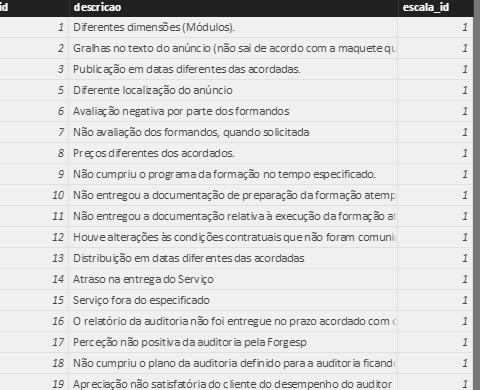
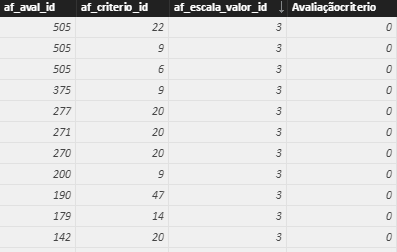
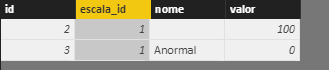
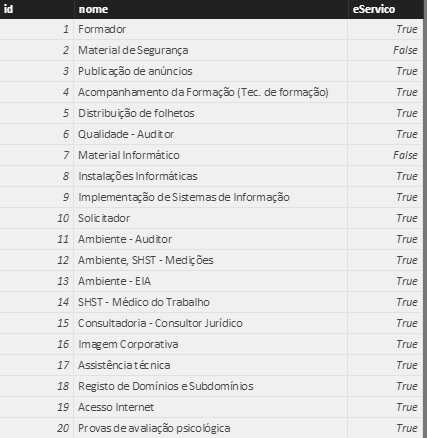
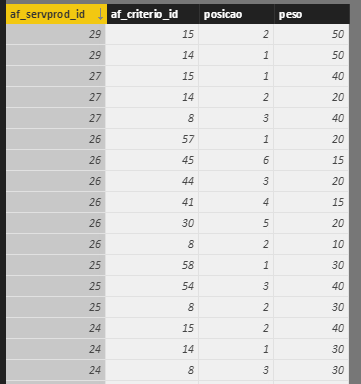
I am having problems with these tables. I need to calculate the (af_escalaItem[valor]*af_servprod_criterios[peso]) for each af_aval_id, but I just can't seem to do this.


Thank you in advance

1 ACCEPTED SOLUTION

Hi @v-ljerr-msft,


Thank you so much for the help but using the formula sumx returns the sum of all the values but that is not what I intended. I think this is my solution:


column=RELATED(af_escalaItem[valor]) *

CALCULATE(

    VALUES(af_servprod_criterios[peso]),

    FILTER(

        af_servprod_criterios,

        af_avaliacaoItens[af_criterio_id] = af_servprod_criterios[af_criterio_id] &&

        RELATED(af_fornecedorAvalia[af_servprod_id]) = af_servprod_criterios[af_servprod_id]

View solution in original post

4 REPLIES 4
Greg_Deckler
Community Champion
Community Champion

It looks like you might be missing some relationships between tables and you may need some "helper" tables.


So, for example, you would need a table with unique "escala_id" values I think and relate all of your tables with "escala_id" columns to this table. Then, you probably need a table with unique "af_servprod_id" values and relate all of your tables with with "af_servprod_id" columns to this table. Then you would need a table that relates "af_servprod_id"'s to "escala_id"'s. Then, you should be able to create a measure or a custom column in your table with unique "escala_id"'s to do the calculation.


Follow on LinkedIn
@ me in replies or I'll lose your thread!!!
Instead of a Kudo, please vote for this idea
Become an expert!: Enterprise DNA
External Tools: MSHGQM
YouTube Channel!: Microsoft Hates Greg
Latest book!:
DAX For Humans

DAX is easy, CALCULATE makes DAX hard...

imagem.png


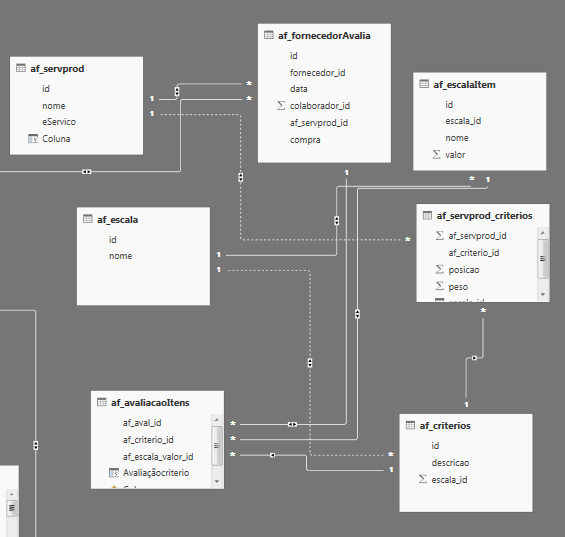
I thought I had those relationships, here is a print of the relationships I made. Do you think there is any missing?


Thank you

Hi @inescosta,


According to the screen shoot of your table relationships above, you should be able to use the formula below to create a new calculate column in "af_avaliacaoItens" table to to calculate the (af_escalaItem[valor]*af_servprod_criterios[peso]) for each af_aval_id.Smiley Happy

NewCalculateColumn = RELATED ( af_escalaItem[valor] ) * SUMX ( RELATEDTABLE ( af_servprod_criterios ), af_servprod_criterios[peso] )


Regards

Hi @v-ljerr-msft,


Thank you so much for the help but using the formula sumx returns the sum of all the values but that is not what I intended. I think this is my solution:


column=RELATED(af_escalaItem[valor]) *

CALCULATE(

    VALUES(af_servprod_criterios[peso]),

    FILTER(

        af_servprod_criterios,

        af_avaliacaoItens[af_criterio_id] = af_servprod_criterios[af_criterio_id] &&

        RELATED(af_fornecedorAvalia[af_servprod_id]) = af_servprod_criterios[af_servprod_id]

Helpful resources

Announcements
FabCon and SQLCon Barcelona 2026

FabCon & SQLCon – Barcelona 2026

Join us in Barcelona for FabCon and SQLCon, the Fabric, Power BI, SQL, and AI community event. Save €200 with code FABCMTY200.

60 days of Data Days Carousel

Data Days 2026

Join Fabric Data Days 2026: 60 days of free live/on-demand sessions, challenges, study groups, and certification opportunities.

Power BI DataViz World Championships carousel

Power BI DataViz World Championships - June 2026

A new Power BI DataViz World Championship is coming this June! Don't miss out on submitting your entry.